
Chapter 18 — Natural Language Processing
18.0. Natural Language Processing
Natural Language Processing (NLP) is a field related to computer science, artificial intelligence, and linguistics that deals with the interaction between computers and humans using natural language. It involves programming computers to understand, interpret, and generate human language in a way that is both effective and efficient.
There are many goals of NLP and related fields:
One major aim of NLP is to create computer systems that can perform tasks that require human-like language capabilities, such as:
- language translation
- sentiment analysis
- text classification
- speech recognition
- natural language understanding.
Another major goal of NLP is to process or prepare linguistic data for use in scientific or business analyses.
NLP uses various techniques, including statistical methods, machine learning algorithms, and deep learning models, to analyze and process human language. These techniques allow computers to recognize patterns, identify relevant information, and generate appropriate responses based on the context and meaning of the language used.
NLP is used in a variety of applications, including search engines, virtual assistants, chatbots, language translation tools, and voice recognition systems. It has become increasingly important as the volume of digital data grows and the need for automated language processing becomes more critical.
In this chapter we are going to introduce some basic concepts in NLP, and some Python modules and algorithms that are popular. A lot of the basics of NLP are ways of searching within, formatting, and manipulating text. We will cover some of those things in the first two sections. Then we will turn to some of the more advanced intersections between NLP and machine learning in the final three sections.
18.1. Regular expressions
One of the building blocks of natural language processing is the development of algorithms for regular expressions. The term “regular expression”, sometimes also called regex or regexp, comes from theoretical computer science, and is used to define a language family with certain properties.
Regular expressions are a technique to search for strings that match certain conditions. So far in this course we have already dealt with some very basic regular expressions, like searching for if a certain character was in a word, or if a word started with a capital letter or ended in punctuation. But that’s just the beginning. Regular expressions can be used to search for a much wider range of things. One nice thing about regular expressions is that the syntax is more or less the same for all popular programming languages like Python, Perl, Java and the C languages.
Basic regex in Python
When we first introduced sequential data types in Python, we talked about the “in” operator:
text = "According to reductionist eliminativists, everything about the mind is reducible to brain function."
result = "brain" in text
print(result)
Output:
TrueRegular expressions are just a much more powerful version of this technique. Regular expressions allow us to use special sequences and metacharacters to perform advanced searches.
Searching for patterns in text
To start, Python has a built-in regular expression module called re. Once you have imported the re module, you can use it to search for patterns in text using the search() method. This method searches for the first occurrence of a pattern in a string, and returns a “Match” object if it is found. Here’s an example:
import re
text = "According to reductionist eliminativists, everything about the mind is reducible to brain function."
pattern = "brain"
match = re.search(pattern, text)
print(match)
pattern = "shoe"
match = re.search(pattern, text)
print(match)

if match:
    print(f"Found {pattern}.")
else:
    print(f"Did not find {pattern}.")
Output:
<re.Match object; span=(84, 89), match='brain'>
None
Did not find shoe.
The re.search(pattern, string) function searches a string for an occurrence of a substring that matches the pattern being searched for. The first substring (from left) that matches will be returned. We can use the match object in conditional statements: If a regular expression matches, we get a match object returned, which is taken as a True value. If no match is found, we get None, which is taken as False.
Match multiple patterns
What if there is more than one occurrence of what you are searching for?
text = "The brain is the most important organ in the body. The brain is responsible for all the body's functions."
pattern = "brain"
matches = re.findall(pattern, text)
print(matches)
Output:
['brain', 'brain']In this example, the findall() method is used to find all occurrences of the pattern “brain” in the string “The brain is the most important organ in the body. The brain is responsible for all the body’s functions.” It returns a list containing all the matches.
Metacharacters
Metacharacters are characters you can insert in a regex statement that allow you to search for all kinds of variable patterns.
Search for disjunctive sets using []
You can use [] (square brackets) in a regex statement to search for a disjunction of a set of characters inside (i.e. that it must match at least one of the characters in the square brackets). This is useful if, for example you need to search for lowercase or capitalized versions of the same thing.
import re
text = "According to reductionist eliminativists, everything about the mind is reducible to Brain function."
pattern = "[Bb]rain"
match = re.search(pattern, text)
You could similarly use square brackets to do things like search for any vowel or any number:
pattern = "[aeiou]"
re.search(pattern, text)
pattern = "[01234556789]"
re.search(pattern, text)
In cases where a set of characters belongs to a defined sequence, you can use a dash with the square brackets to specify any one character in a range.
pattern = "[A-Z]"  # any capital letter
re.search(pattern, text)
pattern = "[0-9]"  # any number
re.search(pattern, text)
You can use the carat ^ to negate the search, i.e. to see if the character or characters are not in the string. This only works if carat is the first element in the square brackets. Anywhere else and it actually searches for the carat. You can use backslash \ as an escape character to ignore the normal special function of a metacharacter.
pattern = "[^?]"  # not a question mark
pattern = "[^0-9]"  # not a number
pattern = "[12^3]" # will search for and match the string "12^3"
pattern "[\^123]" # will search for and match the string "^123"
Optional characters using ?
What if we want to search for a pattern but allow it to have optional characters? A common version of this would be searching for a singular or plural version of a word. We can use a ? character for this. The ? metacharacter returns a match to the string that comes before it, with or without the character that comes right before it. You will sometimes see this referred to as matching zero or one occurrence of the previous character.
pattern = "brains?"  # will return a match for "brain" or "brains"
pattern = "colou?r"  # will return a match for "color" or "colour"
Repetitions of characters using *
You can use an asterisk * to look for repetition of symbols. You will often see this described as matching zero or more occurrences of the previous character.
pattern = "3*" # will match any sequence of 3's: 3, 33, 333, 3333333333It can be used in conjunction with square brackets. Metacharacters ignore other metacharacters.
pattern = "[0-9][0-9]*"  # matches any sequence of numbers of any length
pattern = "[xy]*"  # "zero or more x's or y's", i.e., xxxx or xyxyxxyxy or yy.
Match at least one of a character using +
You can use the + metacharacter to match one or more of a character.
pattern = "a+"  # will match one or more a's
pattern = "[0-9]+"  # one or more numbers
Match any character (except newline) with .
A very important metacharacter, often called the “wildcard”, is the . It can be used to to fill into a any character where it is inserted.
pattern = "sp.n"  # matches any string wtih s-p-something-n, like spin, span, spun, spkn
pattern = "brain.*brain"  # matches any string where "brain" appears twice
Anchors
Anchors are metacharacters that check for regular expressions to particular places in a string. Examples of anchors are ˆ and $. The caret ˆ matches a string at the start of a line.
pattern = "^Brains" # matches the word "Brains" at the beginning of the string (case-sensitive)Note that this makes ^ (caret) have three uses: 1) a match at the start of a line, 2) negation inside of square brackets, and 3) just to mean a caret.
Summary of metacharacters
Above we have covered some but not all the metacharacters. Below is a table summary of the metacharacters we have discussed, as well as a few more:
| Metacharacter | Description | Example |
|---|---|---|
| . | Matches any character except newline | re.findall(r'.a', 'banana') matches ‘ba’ and ‘na’ |
| ^ | Matches the beginning of a string | re.findall(r'^The', 'The brain is the most important organ in the body.') matches ‘The’ |
| $ | Matches the end of a string | re.findall(r'body\.$', 'The brain is the most important organ in the body.') matches ‘body.’ |
| * | Matches zero or more occurrences of the previous character | re.findall(r'ba\*n', 'banana') matches ‘ban’ and ‘banana’ |
| + | Matches one or more occurrences of the previous character | re.findall(r'ba+n', 'banana') matches ‘banan’ |
| ? | Matches zero or one occurrence of the previous character | re.findall(r'ba?n', 'banana') matches ‘bn’ and ‘ban’ |
| {m} | Matches exactly m occurrences of the previous character | re.findall(r'ba{2}n', 'banana') matches ‘baan’ |
| {m,n} | Matches between m and n occurrences of the previous character | re.findall(r'ba{1,2}n', 'banana') matches ‘ban’ and ‘baan’ |
| [] | Matches any character inside the brackets | re.findall(r'[abc]', 'banana') matches ‘a’ and ‘b’ |
| [^] | Matches any character not inside the brackets | re.findall(r'[^abc]', 'banana') matches ‘n’ |
| () | Groups together a pattern | re.findall(r'(ba)+', 'bananabanana') matches ‘bana’ |
| \ | Escapes a metacharacter | re.findall(r'\.', 'banana.') matches ‘.’ |
Special sequences
In addition to the standard metacharacters, there are also special sequences that can look for even more kinds of matches.
| Character | Description | Example |
|---|---|---|
Matches the start of a string (like ^, but \A is string-specific, not line-specific) |
"\ABrain" will match “Brain” at the start of the string. |
|
| Matches a word boundary (the position between a word character and a non-word character) | r"\bBrain" matches “Brain” at the beginning of a word, "Brain\b" matches at the end of a word. |
|
Matches where \b does not, i.e., not at a word boundary |
r"\Bain" matches “ain” in “Brains” but not at the start or end of a word. |
|
Matches any digit (equivalent to [0-9]) |
"\d" matches “3” in “Brain3”. |
|
Matches any non-digit (equivalent to [^0-9]) |
"\D" matches “B” in “Brain3”. |
|
| Matches any whitespace character (e.g., space, tab, newline) | "\s" matches the space in “Brain Power”. |
|
| Matches any non-whitespace character | "\S" matches “B” in ” Brain”. |
|
Matches any word character (alphanumeric + underscore, [a-zA-Z0-9_]) |
"\w" matches “B” in “Brain”. |
|
Matches any non-word character (anything not in [a-zA-Z0-9_]) |
"\W" matches the space in “Brain Power”. |
|
Matches the end of a string (like $, but \Z is string-specific, not line-specific) |
"Brain\Z" matches “Brain” only at the end of a string. |
Complex examples
Regular expressions are incredibly powerful, and also incredibly complicated. You can do crazy stuff. Consider this example. Consider the following imaginary list of phone numbers. Not all entries contain a phone number, but if a phone number exists it is the first part of an entry. Then, separated by a blank, a surname follows, which is followed by first names. Surname and first name are separated by a comma. The task is to rewrite this example in the following way:
import re
text_list = ["847-8096 Bieber, Justin",
             "124-7852 West, Kanye",
             "Swift, Taylor",
             "175-1485 Knowles, Beyonce Giselle "]

for i in text_list:
    res = re.search(r"([0-9-]*)\s*([A-Za-z]+),\s+(.*)", i)
    print(res.group(3) + " " + res.group(2) + " " + res.group(1))
output:
Justin Bieber 847-8096
Kanye West 124-7852
Taylor Swift
Beyonce Giselle Knowles 175-1485
So if you have text in a particular format, you can use very complex regular expressions to match part of it, and then reformat it in various ways.
You can use it to do all kinds of validation of data, for example emails, passwords, urls, and social media data:
def validate_email(email):
    regex = r"^[a-zA-Z0-9._%+-]+@[a-zA-Z0-9.-]+\.[a-zA-Z]{2,}$"
    return bool(re.match(regex, email))
This regular expression:
- checks that the email address contains one or more alphanumeric characters, dots, underscores, percent signs, plus signs, or hyphens before the “@”
- that the domain name consists of one or more alphanumeric characters, dots, or hyphens, followed by a period and two or more alphabetical characters.
If the email address matches this pattern, the function returns True, indicating that the email address is valid. Otherwise, the function returns False.
Here are some other examples:
def extract_urls(text):
    regex = r"(http|https):\/\/[a-zA-Z0-9-\.]+\.[a-zA-Z]{2,}(\S*)"
    return re.findall(regex, text)

def validate_password(password):
    regex = r"^(?=.*\d)(?=.*[a-z])(?=.*[A-Z])(?=.*[!@#$%^&*()_+}{\":;\'?\/><.,])(?!.*\s).{8,}$"
    return bool(re.match(regex, password))

def preprocess_tweet(tweet):
    tweet = re.sub(r"http\S+", "", tweet) # Remove URLs
    tweet = re.sub(r"@\S+", "", tweet) # Remove mentions
    tweet = re.sub(r"#\S+", "", tweet) # Remove hashtags
    tweet = re.sub(r"[^\w\s]", "", tweet) # Remove punctuation marks
    return tweet
18.2. NLP modules
In addition to the built-in re module, there are a number of other third-party modules for doing natural language processing in Python:
- NLTK (Natural Language Toolkit): NLTK is one of the most popular NLP libraries for Python. It provides a wide range of tools and modules for natural language processing, such as tokenization, stemming, lemmatization, part-of-speech tagging, and named entity recognition. NLTK is open-source, easy to use, and has a large community of contributors.
- spaCy: spaCy is a popular NLP library that is designed for performance and efficiency. It provides advanced features such as entity recognition, dependency parsing, and vectorization. spaCy is known for its speed and accuracy and is widely used in industry and academia.
- TextBlob: TextBlob is a Python library for processing textual data. It provides a simple interface for performing common NLP tasks such as sentiment analysis, part-of-speech tagging, and noun phrase extraction. TextBlob is built on top of NLTK and provides an easy-to-use interface for NLP tasks.
- Gensim: Gensim is a library for topic modeling and document similarity analysis. It provides tools for unsupervised learning of topics from text data, as well as for finding similar documents or passages within a larger corpus.
- scikit-learn: scikit-learn, which we have already discussed also provides tools for text analysis. It includes modules for text classification, clustering, and feature extraction.
It is beyond the scope of our course to cover all of these tools here. We are going to focus on SpaCy, as it is one of the more popular tools in research and industry due to its speed and accuracy.
Installing spaCy
You can install spaCy like other third party modules:
uv add spacyIn addition to downloading the spaCy module, you also need to download a language model for it. This is its information about the rules of a language it uses to do all of its business. There are spaCy language modules for many different languages. For many languages they also come in different sizes (small, medium, and large), with bigger sized language models being more accurate but also using more disk space and running more slowly. Let’s install the medium English model. To do this, type the following at the command line:
python -m spacy download en_core_web_mdTokenization
One of the primary uses of modules like spaCy is tokenization. Tokenization is taking a bunch of text and splitting it into a list of words or word-like units (called tokens). We’ve done this ourselves in earlier chapters while learning some Python basics, but in the real world we use modules like spaCy to do it for us. Here’s an example of loading a file that contains the first paragraph of the wikipedia entry on Cognitive Science.
Cognitive science is the interdisciplinary, scientific study of the mind and its processes with input from linguistics,
psychology, neuroscience, philosophy, computer science/artificial intelligence, and anthropology. It examines the
nature, the tasks, and the functions of cognition (in a broad sense). Cognitive scientists study intelligence and
behavior, with a focus on how nervous systems represent, process, and transform information. Mental faculties of concern
to cognitive scientists include language, perception, memory, attention, reasoning, and emotion; to understand these
faculties, cognitive scientists borrow from fields such as linguistics, psychology, artificial intelligence, philosophy,
neuroscience, and anthropology. The typical analysis of cognitive science spans many levels of organization,
from learning and decision to logic and planning; from neural circuitry to modular brain organization. One of the
fundamental concepts of cognitive science is that "thinking can best be understood in terms of representational
structures in the mind and computational procedures that operate on those structures."
import spacy
nlp = spacy.load("en_core_web_md")
with open("cogsci.txt") as f:
text = f.read()
tokens = nlp(text)
print(tokens)output
Cognitive science is the interdisciplinary, scientific study of the mind and its processes with input from linguistics,
psychology, neuroscience, philosophy, computer science/artificial intelligence, and anthropology. It examines the
nature, the tasks, and the functions of cognition (in a broad sense). Cognitive scientists study intelligence and
behavior, with a focus on how nervous systems represent, process, and transform information. Mental faculties of concern
to cognitive scientists include language, perception, memory, attention, reasoning, and emotion; to understand these
faculties, cognitive scientists borrow from fields such as linguistics, psychology, artificial intelligence, philosophy,
neuroscience, and anthropology. The typical analysis of cognitive science spans many levels of organization,
from learning and decision to logic and planning; from neural circuitry to modular brain organization. One of the
fundamental concepts of cognitive science is that "thinking can best be understood in terms of representational
structures in the mind and computational procedures that operate on those structures."
So it looks as though nothing happened. But it’s actually a complex spaCy “doc” data structure that just looks like a block of text if you print it. We can see that it is actually a sequence if we print the first 20 elements:
for token in tokens[:20]:
    print(token)
Output:
Cognitive
science
is
the
interdisciplinary
,
scientific
study
of
the
mind
and
its
processes
with
input
from
linguistics
,
psychology
Properties of spaCy tokens
If this had been the string that it appeared to be, we would have gotten the first 20 characters. Instead, we get the first 20 tokens. Notice that it split off the punctuation for us. That’s nice! This is why we call it “tokens” and not “words”. So it looks like a list of tokens. But in fact each token is itself not a string but its own complex data structure from which we can extract other information:
token.text: the original text of the tokentoken.lemma_: the base form of the token (e.g., “run” instead of “running”)token.pos_: the part-of-speech tag of the token (e.g., “NOUN”, “VERB”, “ADJ”, etc.)token.tag_: a more detailed part-of-speech tag (e.g., “NN” for a singular noun, “NNS” for a plural noun, etc.)token.dep_: the syntactic dependency label of the token (e.g., “SUBJ”, “OBJ”, “ADJ”, etc.)token.is_stop: a boolean flag indicating whether the token is a stop word (i.e., a common word that is often removed in text processing for meaningful words)
Let’s see:
for token in tokens:
    print(token.text, token.lemma_, token.pos_, token.tag_, token.dep_, token.is_stop)
output:
Cognitive cognitive ADJ JJ amod False
science science NOUN NN nsubj False
is be AUX VBZ ROOT True
the the DET DT det True
interdisciplinary interdisciplinary ADJ JJ amod False
, , PUNCT , punct False
scientific scientific ADJ JJ amod False
study study NOUN NN attr False
of of ADP IN prep True
the the DET DT det True
mind mind NOUN NN pobj False
and and CCONJ CC cc True
its its PRON PRP$ poss True
processes process NOUN NNS conj False
with with ADP IN prep True
input input NOUN NN pobj False
from from ADP IN prep True
linguistics linguistic NOUN NNS pobj False
, , PUNCT , punct False
psychology psychology NOUN NN conj False
So here we can see that, for example, .lemma_ removes the plural marker from processes, and tells us that it is a noun, a plural noun (that’s what NNS stands for as a .tag_), and that it is a dependent of a conjunction (conj for .dep_), (i.e. the mind and its processes). All those codes and their definitions can be looked up here: https://spacy.io/api/data-formats.
There are all kinds of analyses you might do with words based on using just their stem form (without plurals or inflection) or based on knowing their part of speech or dependencies.
spaCy is a predictive model; it makes mistakes
One important caveat: spaCy is itself using machine learning to process a text corpus and turn it into parts of speech and dependencies. It is not using simple rules. Consider, for example, the following example:
some_text = "Will you have a drink with me. Will you drink with me?"
tokens = nlp(some_text)
for token in tokens:
    print(token.text, token.lemma_, token.pos_, token.tag_, token.dep_, token.is_stop)
Output:
Will will AUX MD aux True
you you PRON PRP nsubj True
have have VERB VB ROOT True
a a DET DT det True
drink drink NOUN NN dobj False
with with ADP IN prep True
me I PRON PRP pobj True
. . PUNCT . punct False
Will will AUX MD aux True
you you PRON PRP nsubj True
drink drink VERB VB ROOT False
with with ADP IN prep True
me I PRON PRP pobj True
? ? PUNCT . punct False
Let’s focus on the word “drink” in these two sentences. In the first sentence it is a noun, in the second it is a verb. How does spaCy know?
There is actually a complex set of classification models like those we talked about last week being used to make predictions. The model is trained on some data that is labeled (i.e. telling us what the part of speech of a word is), and then uses that to learn a procedure to make guesses about new text. So maybe it learns that tokens that follow tokens like “a” and “the” are nouns, whereas tokens that follow pronouns like “you” are verbs. In reality, the model is doing something a lot more complex than this, but that’s the basic idea.
The fact that spaCy is making predictions from a model means that it will sometimes make mistakes. spaCy is known for being very accurate, but it is not perfect. You can imagine trying to mess with its predictions by having difficult sentences. Take, for example, this classic sentence used in psychology of language experiments:
some_text = "The old man the boats."
tokens = nlp(some_text)
for token in tokens:
    print(token.text, token.lemma_, token.pos_, token.tag_, token.dep_, token.is_stop)
Output:
The the DET DT det True
old old ADJ JJ amod False
man man NOUN NN ROOT False
the the DET DT det True
boats boat NOUN NNS appos False
. . PUNCT . punct False
This is called a “syntactic garden path” sentence. This is because your really strong belief after reading the first three words is that “man” is a noun, probably because 1) it usually is, in general, and 2) 99.9999% of the time it is when it starts a sentence like “the old man”. However, in this sentence man is a verb (as in, “to man the boats, which means to handle or work on the boat”. The word “old” is the noun, as in “the old people handle the boats”. But because both “old” and “man” are being used in a very unusual way, this sentence is very difficult to parse. spaCy is misled by the statistics of language in the same way that people are.
Part-of-speech (PoS) tagging
Let’s talk a bit more about part-of-speech tagging and why it’s useful. Suppose you have a large corpus of text, such as a collection of news articles or social media posts, and you want to analyze the frequency and distribution of different parts of speech in the text. One way to do this is to use spaCy to perform PoS tagging on the text. You might also want to identify the nouns in a sentence, so that you can do follow-up analyses just on the nouns.
Here are some use cases of PoS tagging:
- Identify common noun phrases or verb phrases in the text, which can be useful for text summarization or information retrieval.
- Analyze the writing style or tone of the text based on the frequency of certain parts of speech, such as adjectives or adverbs.
- Extract named entities, such as people, organizations, or locations, which can be useful for text classification or entity recognition.
Overall, PoS tagging is a fundamental task in NLP and is used in many applications, such as text classification, machine translation, and information extraction. By understanding the syntactic structure of text, we can gain insights into its meaning and use it to train more accurate and effective NLP models.
Named entity recognition (NER)
Another common use of spaCy is for a procedure called named entity recognition. Named entity recognition is, like it sounds, a function that gives you a list of the names in a spaCy document, as well as the kind of entity that it is.
Suppose you have a large corpus of text, such as news articles or social media posts, and you want to extract named entities from the text, such as people, organizations, and locations. One way to do this is to use spaCy’s NER capabilities.
import spacy

nlp = spacy.load("en_core_web_md")

text = "Barack Obama was born in Hawaii and went to Harvard Law School. He later became the President of the US."
doc = nlp(text)

for ent in doc.ents:
    print(ent.text, ent.label_)
Output:
Barack Obama PERSON
Hawaii GPE
Harvard Law School ORG
US GPE
In this code, we load the en_core_web_md model in spaCy, and then apply it to a sample text consisting of two sentences. We then iterate over the sequence of Span objects in the resulting Doc object and print out the text and label_ attributes of each entity.
The label_ attribute contains the named entity label for each entity, which is a string that indicates the type of the entity, such as PERSON, ORG, or GPE (geopolitical entity). By analyzing the frequency and distribution of these labels in the text, we can gain insights into the types of entities that are mentioned in the text and their relationships to each other.
For example, we might use NER to:
- Extract mentions of people, organizations, and locations from a large corpus of text, which can be useful for building a knowledge graph or social network analysis.
- Identify mentions of specific products or brands in customer feedback or reviews, which can be useful for market research.
- Extract mentions of medical conditions or drug names from clinical notes or patient records, which can be useful for healthcare analytics or research.
Overall, NER is a key task in NLP and is used in many applications, such as text classification, question answering, and information retrieval. By identifying and extracting named entities from text, we can gain insights into the underlying meaning and structure of the text, and use this information to build more accurate and effective NLP models.
Dependency parsing
Another thing we can do with spaCy is what is called getting a dependency structure for a sentence. Dependencies represent the grammatical relationships between tokens in a sentence. More specifically, a dependency is a directed relationship between a “head” token and a “child” token, where the head token is the word that governs the meaning of the child token.
Each token in a sentence is assigned a dependency label that describes its relationship to its head token. The most common dependency labels used in spaCy are:
- ROOT: The root of the sentence, usually the main verb.
- nsubj: The subject of a verb.
- dobj: The direct object of a verb.
- iobj: The indirect object of a verb.
- ccomp: A clause serving as the complement of a verb or adjective.
- pobj: The object of a preposition.
There are many other dependency labels used in spaCy, each with its own meaning and function.
Here’s an example sentence with its dependency tree:
text = "I ate pizza for dinner."
doc = nlp(text)
for token in doc:
    print(token.text, token.dep_)
Output:
I nsubj
ate ROOT
pizza dobj
for prep
dinner pobj
. punct
Here, spaCy tells us that “ate” is the main verb of the sentence, that “I” is the subject of the sentence (marked as “nsub”), that “pizza” is the direct object of the verb (labeled as “dobj”), that “for” is a preposition and that “dinner” is the preposition’s object.
Let’s look at a more complex sentence:
text = "The dog that chased the cat belongs to my neighbor."
doc = nlp(text)

# Print the dependencies for each token in the Doc
for token in doc:
    print(token.text, token.dep_)
Output:
The det
dog nsubj
that nsubj
chased relcl
the det
cat dobj
belongs ROOT
to prep
my poss
neighbor pobj
. punct
In this sentence, the verb “belongs” is the root of the dependency tree. The subject of the verb is “dog”, which is modified by a relative clause that begins with the relative pronoun “that”. The relative clause has its own subject “that” and object “cat”, and is connected to the main verb with the relcl dependency label. The relcl dependency label is used to indicate the relationship between the verb “chased” and the relative pronoun “that”, which is its subject. The prepositional phrase “to my neighbor” modifies the verb and is connected to it with the pobj dependency label. The possessive pronoun “my”modifies the noun “neighbor” and is connected to it with the poss dependency label.
Sentences and noun chunks
A spaCy doc is presented as a list of all tokens. But you can also get it as a list of sentences or a list of noun “chunks” (contiguous sequences of nouns and their modifiers):
text = "Barack Obama was born in Hawaii and went to Harvard Law School. He later became the President of the US."
doc = nlp(text)
for sent in doc.sents:
    print(sent.text)
print()
for noun_chunk in doc.noun_chunks:
    print(noun_chunk)
Output:
Barack Obama was born in Hawaii and went to Harvard Law School.
He later became the President of the US.
Barack Obama
Hawaii
Harvard Law School
He
the President
the US
Word embeddings
A final thing you can use spaCy to get is what is called a “word embedding”. A word embedding is a vector representation of a word’s meaning, calculating using machine learning algorithms that look at the context surrounding a word. For example, the vector representations for “dog” and “cat” will be similar to each other because they tend to appear in very similar contexts.
One way of describing this is that if you made a list of all the sentences that have “dog” in them, how many of those sentences could have had “cat” substituted for “dog” and still meant something very similar? A lot of them. But those same sentences could not have had “shoe” substituted and made sense.
A word embedding gives you a way to measure the meaning of words, and allows you to do things like compare the meaning of words and sentences for how similar they are. You can compute the similarity of two words’ meanings by computing the correlation or cosine of their word embedding vectors.
Here is an example:
import numpy as np

word_list = ["dog", "cat", "shoe", "sock"]

for word1 in word_list:
    vector1 = nlp.vocab[word1].vector
    for word2 in word_list:
        vector2 = nlp.vocab[word2].vector
        similarity = np.corrcoef(vector1, vector2)[0,1]
        print(f"{word1} {word2} {similarity:0.3f}")
Output:
dog dog 1.000
dog cat 0.822
dog shoe 0.335
dog sock 0.283
cat dog 0.822
cat cat 1.000
cat shoe 0.283
cat sock 0.261
shoe dog 0.335
shoe cat 0.283
shoe shoe 1.000
shoe sock 0.664
sock dog 0.283
sock cat 0.261
sock shoe 0.664
sock sock 1.000
Here we can see that a word’s correlation with its own vector is 1, as it should be. Dog and cat have a high correlation (0.822), and so do shoe and sock (though not as high, 0.664). The other correlations are all quite a bit lower. Though they are still positive because these are all nouns.
18.3. Text clustering and classification
In this section we’re going to talk a little more about some ways that you can apply machine learning to text.
Document clustering and classification
One common technique in NLP is to take documents (defined broadly, we could mean sentences, paragraphs, books, emails, social media posts, etc.) and to cluster them based on their content. There are a number of different approaches to this:
As a basic example, consider the following example. Imagine we had a bunch of social media posts, and we were interested in clustering their content. A simple way to do this would be the following:
- create a list of all the unique words across all the social media posts
- create an array for each post, tracking the word frequencies of each word in each post
- cluster those arrays
Here is some simple code that could do this, under the assumption the posts were all in a single file, one post per line:
import spacy
import numpy as np
from sklearn.preprocessing import StandardScaler
from sklearn import cluster

def get_posts(post_directory_path):
    # get a list of spacy docs for each social media post in a file
    doc_list = []
    nlp = spacy.load("en_core_web_md")
    with open(post_directory_path) as f:
        for line in f:
            line = line.strip('\n').strip()
            doc = nlp(line)
            doc_list.append(doc)
    return doc_list

def get_unique_tokens(doc_list):
    # get a dictionary with each unique token pointing to a unique id number
    unique_tokens = set()
    for doc in doc_list:
        for token in doc:
            unique_tokens.add(token.text)
    token_index_dict = {}
    for i, token in enumerate(unique_tokens):
        token_index_dict[token] = i
    return token_index_dict

def get_token_matrix(doc_list, token_index_dict):
    # create a matrix with a row for each document, and a column for each token, giving us the freq of each
    # token in each document
    token_count_matrix = np.zeros([len(doc_list), len(token_index_dict)])
    for i, doc in enumerate(doc_list):
        for token in doc:
            token_index = token_index_dict[token]
            token_count_matrix[i, token_index] += 1
    return token_count_matrix

def cluster_documents(token_count_matrix):
    # run the clustering algorithm
    clustering_alg = cluster.MiniBatchKMeans(n_clusters=4, n_init="auto")
    clustering_alg.fit(token_count_matrix)
    y_pred = clustering_alg.predict(token_count_matrix)
    return y_pred

doc_list = get_posts("posts/")
token_index_dict = get_unique_tokens(doc_list)
token_count_matrix = get_token_matrix(doc_list, token_index_dict)
document_clusters = cluster_documents(token_count_matrix)
Now, this algorithm would probably not work super well, there would be a lot we’d want to do to improve it, such as:
- clean the posts to remove text we didn’t want to include
- doing normalization and data reduction to do our clustering on a smaller number of better structured dimensions
But the basics of doing things like detecting spam emails, or classifying posts on social media as harmful or offensive start with algorithms like this that might find patterns in the words being used. If you had labeled data (say, for example a list of posts labeled as either offensive or unoffensive) you could use that dataset to build a classifier that would make guesses about other posts.
Sentiment analysis
One specific kind of document classification is called “Sentiment analysis”. Sentiment analysis is an algorithm that can give you a score on a sequence of text telling you if that text is “positive” (“I love pizza!”) or “negative” (“I hate broccoli!”). This is used in many practical settings to evaluate text. Sentiment analysis algorithms are trained in the way described above, just trying to predict each sequence of text categorically as positive polarity (+1) or negative polarity (-1), or sometimes in a more standard regression format with a quantitative score ranging from -1 to +1.
The NLP package TextBlob is an easy way to get sentiment analysis scores. First install it:
uv add textblobThen you can use it like this:
from textblob import TextBlob

sentence_list = [
    "I really love pizza",
    "I really hate broccoli",
    "I am not sure how I feel about plums.",
    "Today is Monday."
]

for sentence in sentence_list:
    blob = TextBlob(sentence)
    sentiment_score = blob.sentiment.polarity
    subjectivity_score = blob.sentiment.subjectivity
    print(sentence, sentiment_score, subjectivity_score)
Output:
I really love pizza 0.5 0.6
I really hate broccoli -0.8 0.9
I am not sure how I feel about plums. -0.25 0.8888888888888888
TextBlob can also give you a score for how “subjective” the sentence is, based on its training. How well do these work? Well you can play around with some in your lab…
18.4. Language Models
Coming Soon.
18.5. Lab 18
Tip: In addition to this chapter, some helpful past sections include 2.4, 2.5, 2.9, and 17.5.
def q1():
    print("\n##### Question 1 #####\n")
    """
    According to the readings for this week, what is the field of natural language processing, and what are some
    of its primary goals or problems that it is used to solve? Answer in a print statement.
    """


def q2():
    print("\n##### Question 2 #####\n")
    """
    Describe a brain and cognitive science question or issue that involves language that you find interesting, and
    describe how you might use natural language processing techniques to solve it. Answer in a print statement.
    """


def q3():
    print("\n##### Question 3 #####\n")
    """
    Explain the code below in a print statement:

    import re
    fh = open("simpsons_phone_book.txt")
    for line in fh:
        if re.search(r"J.*Neu", line):
            print(line.rstrip())
    fh.close()
    """


def q4():
    print("\n##### Question 4 #####\n")
    """
    Write a regular expression to match any sequence of lowercase letters that ends with the letter "e". Print said
    regular expression in a print statement.
    """


def q5():
    print("\n##### Question 5 #####\n")
    """
    Write a regular expression to match any sequence of characters that starts with an uppercase letter and is
    followed by one or more digits or spaces, and ends with a period. Print said regular expression in a print statement.
    """


def q6():
    print("\n##### Question 6 #####\n")
    """
    Write a regular expression to match any sequence of digits that starts with the digit "1" and is followed by either
    "0", "1", or "2". Print said regular expression in a print statement.
    """


def q7():
    print("\n##### Question 7 #####\n")
    """
    Load the document "data/ch11/cogsci.txt". Use spacy to make a list of all the sentence subjects in the
    document. Use a print statement to output the list.

    """


def q8():
    print("\n##### Question 8 #####\n")
    """
    Load the document "data/ch11/cogsci.txt". Use spacy to make a list of all the unique entities in the
    document. Use a print statement to output the list.
    """


def q9():
    print("\n##### Question 9 #####\n")
    """
    Create a list of 15 sentences:
        - five that you think are "positive valence"
        - five that you think are "negative"
        - five that you think might be tricky to classify
    It should go without saying, but please do not use any
    inappropriate sentences or language that would violate the
    student code of conduct...
    Use the textblob module to get the valance scores of those sentences.
    Print the sentences and the results.
    """


def q10():
    print("\n##### Question 10 #####\n")
    """
    Make a list of 16 words. Use spacy to get the word embedding vectors for these words. Then use numpy to
    calculate the similarities of each of these words with each other word, and save the values in a numpy
    matrix. Then use this matrix to create a dendrogram hierarchical cluster plot in matplotlib.
    """


def main():
    q1()
    q2()
    q3()
    q4()
    q5()
    q6()
    q7()
    q8()
    q9()
    q10()


if __name__ == "__main__":
    main()
Homework 18
Tip: In addition to this chapter, past helpful sections would be 2.9, 5.2 to 5.4, 14.0 to 14.3, 15.3, and 15.4.
Prepare the project directory
Create a directory called HW18/. Within it, create two directories:
- a
texts/directory - a
src/directory
Download two books from the Project Gutenberg website using Python
Project Gutenberg is a website that hosts free ebooks for many classic books. We’re going to use it to analyze and compare two books.
In the src/ directory, make a Python script called download_novels.py. In that script, insert this code (but note that you will need to change the book_id_list):
import requests
import os

def download_gutenberg_book(book_id):
    # Construct the URL for the book
    url = f"http://www.gutenberg.org/files/{book_id}/{book_id}-0.txt"

    # Send a request to the URL
    response = requests.get(url)

    # Check if the request was successful
    if response.status_code == 200:
        # Get the book title from the response headers
        title = f"book_{book_id}"

        # Write the book contents to a new file in the directory
        filename = os.path.join("..", "texts", f"{title}.txt")
        with open(filename, "wb") as f:
            f.write(response.content)

        print(f"Downloaded {title} ({book_id}) to {filename}.")
    else:
        print(f"Failed to download book {book_id}.")

book_id_list = [98, 105]  # replace with the book ids you want to download
for book_id in book_id_list:
    download_gutenberg_book(book_id)
Next, go to the Project Gutenberg website and choose two books to add to the book_id_list. Each book on project gutenberg has a page like this: 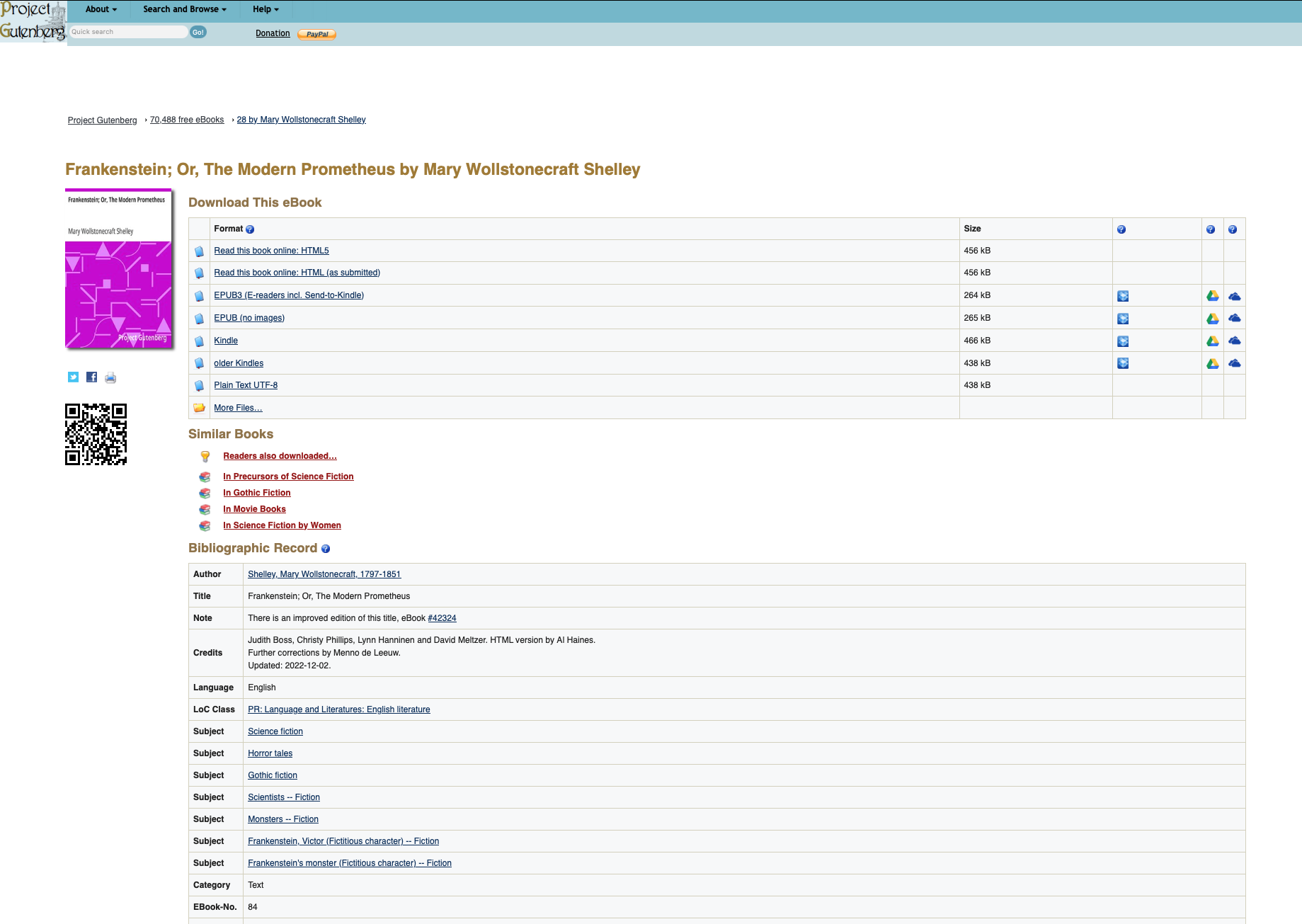
Each book has a unique id number. Frankenstein, for example in the image, is EBook-No. 84. Get the numbers and add them to your list. Run the script and you should get the two books downloaded into your texts/ directory.
Perform a sentiment analysis of both books
Next we want to see which of the books is more positive or negative in its polarity, and how that changes over the course of the book, and how it varies by different subjects in the book. In src/, create a script called analyze_books.py. Paste in the following code, and then complete it as described. You may use other imports as needed, but you should not use any additional 3rd party libraries beyond the ones already imported.
import os
import spacy
import re
from textblob import TextBlob
import pandas as pd
import numpy as np
import matplotlib.pyplot as plt

def load_text_strings(path):
    '''
    This function should create a return a list of strings for each text stored in the path variable.
    It should also create a list of the names of each text, using the filename.
    If your filenames are not the actual names of the books, you can manually change them.
    '''
    text_string_list = []
    text_name_list = []
    return text_string_list, text_name_list

def clean_text_string(text_string):
    '''
    This function should take a single text string and clean it and return the cleaned version.
    Clean it by doing the following:
    - strip any spaces at the beginning or end of the string
    - convert the string to lower case
    - replace the hidden character `\ufeff` (this is an encoding character in project
      Gutenberg texts) with an empty string
    - replace all line breaks `\n` with spaces
    - use a regular expression to find any cases of 2 or more consecutive spaces,
      and replace them with a single space each.
    - Make sure you do the above step **last** so that you don't inadvertently
      end up with two spaces next to each other.
    '''
    return text_string

def get_spacy_doc(text_string):
    '''
    This function should take a text string as input and return a spacy document as an output
    '''
    print(f"### Tokenizing ###")
    doc = None
    return doc

def get_sentence_string_list(doc):
    '''
    This function should take a spacy doc as input and return a list of sentences from the doc,
    as strings (not spacy docs)
    '''
    sentence_string_list = []
    return sentence_string_list

def get_sentence_subject_list(doc):
    '''
    This function should take a spacy doc as input and return a list of subjects of each sentence
    in the doc
    '''
    print(f"### Getting Subjects ###")

    sentence_subject_list = []
    return sentence_subject_list

def get_sentence_index_list(sentence_string_list, num_bins):
    '''
    This function should take a list of sentence strings and an int `num_bins` as input, and return two lists:
    - `sentence_index_list`: a unique number for each sentence in the list
    - a "bin" number that is computed by dividing the list of sentences into `num_bins` different bins, and
        listing which bin each sentence is in. For example, if there were 20 sentences, and the number of bins
        was 4, then the list should be [0,0,0,0,0,1,1,1,1,1,2,2,2,2,2,3,3,3,3,3].
    '''
    sentence_index_list = []
    sentence_bin_list = []

    return sentence_index_list, sentence_bin_list

def get_polarity_score_list(sentence_list):
    '''
    This function should take a list of sentence strings as inputs and use textblob to return a list of
    polarity scores for each sentence
    '''
    print(f"### Getting Polarity Scores ###")
    polarity_list = []
    return polarity_list

def get_text_title_list(text_title, n):
    '''
    This function should take the text title and an integer n, and return a list of the text title repeated n
    times
    '''
    title_list = []
    return title_list

def mean_polarity_by_bin(df):
    '''
    This function should take the main df as input, and return a dataframe giving summary statistics of polarity
    for each bin of each text. So if you have two novels and 10 bins per novel, you should end up with a df with
    20 rows and the following columns: [index, text_title, bin, polarity_mean, polarity_stderr, polarity_count]
    polarity_stderr = polarity_std / (polarity_count**0.5)
    '''
    mean_polarity_by_bin_df = None
    return mean_polarity_by_bin_df

def plot_mean_polarity(mean_polarity_by_bin_df):
    '''
    This function should create a line plot with one line for each novel, and the mean polarity at each bin
    as the points in each line, and the stderr for each bin as error bars at each point. Make sure to label
    the axes and figure
    '''
    pass

def get_subject_polarity_df(df, n):
    '''
    This function should get us the mean and other summary statistics of the polarity for each sentence
    subject in each novel, after removing pronouns. Then reduce the dataframe to only the n most frequent
    sentence subjects

    Create the DataFrame below that:
        - takes the full DataFrame as an input
        - filters out rows where the subject is a pronoun in the list below
        - computes the summary statistics of each sentence's subject's polarity, grouped by `text_title`
        - keep only the resulting rows with the `n` highest scores for `polarity_count` for each novel
        - in other words, if `n=3`, and you have 2 novels, you should end up with a df with 6 rows and the following columns:
            [index, text_title, sentence_subject, polarity_mean, polarity_stderr, polarity_count]
            `polarity_stderr = polarity_std/(polarity_count**0.5)`
    '''
    mean_subject_polarity_df = None
    pronoun_list = ["he", "she", "it", "you", "i", "we", "they", "one", "these", "this", "that"]
    return mean_subject_polarity_df

def plot_subject_polarity(mean_subject_polarity_df):
    '''
    Create a figure with k subplots, where k represents the number of novels.
    So one subplot for each novel (but dont hard code 2; it should work with any number you specify).
    I would suggest outputting a figure with 1 column and k rows.
    Each subplot should be a bar plot of the average polarity of the sentence subjects in that novel.
    Error bars should be the standard error, i.e. the std/sqrt(count)
    Make sure to label the figure, subplots, and axes.
    '''
    pass

def main():
    path = "../texts"  # the path to the saved text files
    test = True  # if we are currently testing the code
    test_size = 50000   # the number of characters from the text to use as our test
    num_bins = 10  # how many bins to split the book into
    num_subjects = 5   # the number of subjects to plot

    text_string_list, text_title_list = load_text_strings(path)  # loading our texts into a list of strings, and a list of titles

    df_list = []  # an empty list to store our dataframes in (one for each text)

    # loop through our list of texts
    for i in range(len(text_title_list)):
        text_string = text_string_list[i]
        text_title = text_title_list[i]
        print(f"\nProcessing {text_title}\n" + 40*"*")

        if test:  # shrink the text to test_size number of characters, for testing purposes
            text_string = text_string[:test_size]

        cleaned_text_string = clean_text_string(text_string)  # get a cleaned version of the string
        doc = get_spacy_doc(cleaned_text_string)  # get a spacy document from the string
        sentence_string_list = get_sentence_string_list(doc)  # get a list of the sentences for the text, as a string
        sentence_subject_list = get_sentence_subject_list(doc)  # get lists of sentences subjects
        polarity_list = get_polarity_score_list(sentence_string_list)  # get list of polarity scores for each sentence
        text_titles = get_text_title_list(text_title, len(sentence_string_list))  # get a list of repetitions of the text title, equal to len(sentence_string_list)
        sentence_index_list, sentence_bin_list = get_sentence_index_list(sentence_string_list, num_bins)  # get a list of index numbers for each sentence in the text

        # test to make sure all lists are the same size
        # print(len(doc), len(sentence_string_list), len(sentence_subject_list), len(polarity_list), len(text_titles), len(sentence_index_list))

        # create a dataframe with the data
        new_df = pd.DataFrame(
            {
                "text_title": text_titles,
                "sentence_index": sentence_index_list,
                "sentence_bin": sentence_bin_list,
                "sentence_subject": sentence_subject_list,
                "polarity": polarity_list
            }
        )
        df_list.append(new_df)
        print()

    # when you have the correct list of dataframes,
    # delete the line assigning df to None, and uncomment the line below it
    df = None # replace this line with the one below when ready
    # df = pd.concat(df_list, ignore_index=True).reset_index()  # concatenate our list of dataframes for each text into one big one

    mean_polarity_by_bin_df = mean_polarity_by_bin(df)  # compute the mean polarity per bin of each book
    plot_mean_polarity(mean_polarity_by_bin_df)  # plot the polarity by bin
    mean_subject_polarity_df = get_subject_polarity_df(df, num_subjects)
    plot_subject_polarity(mean_subject_polarity_df)

if __name__ == "__main__":
    main()