
Chapter 1 — Variables, Data Types, and Conditionals
1.0 Python Statements and Expressions
Python is a language that consists of statements and expressions.
A statement is how we refer to any line of code that Python can execute. Here are some examples.
x = 5
if x > 10:
    print("x is greater than 10")
else:
    print("x is not greater than 10")
An expression is a piece of code that evaluates to a value. Below I’ve included some examples of expressions and statements, with their descriptions written in comments next to them.
2 + 3 # Expression, evaluates to 5
a = [1, 2, 3] # Assignment statement, not an expression
[i * 2 for i in a] # List comprehension, an expression that evaluates to [2, 4, 6]
b = [i * 2 for i in a] # Assignment statement that assigns b to the value of that expression
x = 5 # Assignment statement, not an expression
y = "dog" # Assignment statement, not an expression
z = x * y # Assignment statement that assigns z to the value of the expression: x * y
q = 5 % 2 # Assignment statement that assigns q to the value of the expression: 5 % 2 (which is 1)
len(a) # Function call expression (this one evaluates to 3)
print("hello world") # Function call expression (this one evaluates to None)By now you’ve already seen several examples of code embedded throughout textbook. These are not meant to be consumed passively; they were written for you to actively experiment with them in your own editor and/or Python terminal (which you can open just by typing python or uv run python in your terminal). As you go along, don’t be afraid to modify the code. In fact, when it does work, you can even try to break things intentionally to get a better understanding of what is and isn’t workable. This is all part of practicing!
A quick way to differentiate between expressions and statements is to remember that expressions have values, while statements are complete instructions. In short:
- An expression is code that evaluates to a value.
- You can use
eval()to evaluate an expression (written as a string) to a value (but notexec()). E.g.,eval("2 + 1")evaluates to 3.
- You can use
- A statement is an instruction that does not evaluate to a value.
- You can use
exec()to execute a statement (written as a string) (but noteval()). E.g.,exec("x = 3 + 5")executes the statementx = 3 + 5, assigningxto have the value of8, but does not return a value. - Some expressions can appear as a statement when written on a line by themselves (this is called an expression statement), such as
len(x)orprint("hello world").
- You can use
Exercise: Statements and Expressions
Part A (expressions)
What will each of the following expressions evaluate to?
3 + 3
5 * 2
10 / 2
5 ** 2
Part B (statements)
Now consider these statements. After running them, what are the final values of x, y, and z?
x = 10 % 3
y = x * 4
z = y * x
Exercise Solution — expand only when you’re ready
3 + 3  # 6
5 * 2  # 10
10 / 2  # 5
5 ** 2  # 25
x = 10 % 3 # 1
y = x * 4 # 4
z = y * x # 41.1. Variables
One of the major concepts to master in computer programming is the notion of a variable, which is just a name that we give to some value. That value can come in many different forms, such as a number, or some text, or a list of items. In Python, variables are created by just assigning some kind of data to the variable using the = sign.
x = 3
y = True
z = ["lions", "tigers", "bears"]
There are many different kinds of data types in Python, including different data types for different kinds of numbers (int, float, and complex), str (short for string) for sequences of characters, and more complex data types like list, set, and dict (short for dictionary) which act as collections of data. We will learn more about different data types in the next section (1.2. Data Types).
Legal variable names
Python’s syntax has rules about what you are allowed to use as a variable name.
- Variables names can only contain letters (A-Z), numbers (0-9), and underscores ( _ ); no other symbols allowed.
- Variables names must start with a letter or an underscore; they cannot start with a number (so “2nd_place” is not a legal variable name, but “_2nd_place” technically is…).
- Variables are case-sensitive, meaning that “x” and “X” would be different variables when assigned.
Variable naming conventions
Beyond the rules listed rules, you can legally name variables whatever you want. However, there are some conventions about good usage, and not following these rules will make your code stand out as “improper” or “unprofessional.” Different programming languages have different conventions, so the conventions for Python may not be the same as for other languages like C# or Java. For now, we will cover basic conventions for the simple data types we have discussed so far and bring up others as they arise.
All variable names should prioritize making the meaning of the variable clear. Someone should be able to look at a variable name and intuitively know what that variable is for. For this reason, in general, single-letter variables (like x and y and z) or generic names (like myvar) should be avoided. Instead, use names that express what that variable is being used to store. For example, if you have a program that stores a question and an answer to the question in a variable, name them question and answer, not x and y or q and a. There are some exceptions to this, such as when you are instantiating well-known math formulas (like y = mx + b, in which case using the variables y, x, m, and b would be ok).
If it helps with readability and understanding, it is perfectly fine to have variable names that are multiple words. If I have a program that counts the number of words in a person’s answer, I might call that variable word_count. Note that in Python, the convention is separate words in a variable name with an underscore. The variable names wordcount, wordCount, WordCount, WORDCOUNT, and WORD_COUNT would all be legal names, but calling it one of those would violate the conventions of Python.
- The two without spaces (
wordcountandWORDCOUNT) are not preferred because not having any marker of the word boundary can make it harder to understand when reading. - The all-caps version with an underscore (
WORD_COUNT) is not preferred except in a special case. All caps variables are typically used in Python to convey that the variable is a constant, a value that will never change throughout the program. This is not a part of the syntax; it is not illegal to change a variable name if it is in all caps. It is just a convention that is followed to make programs easier to understand. - In Python we prefer to use “snake case” (e.g.,
word_count) when naming variables. We use Pascal Case (e.g.,WordCount) when naming classes (more on that in later chapters). Sometimes you may see the use of Camel Case (e.g.,wordCount) when naming functions and methods, but snake case is usually preferred.
Assigning variables to other variables
You can assign variables to other variables. With the basic data types bool, int, float, and str, when a variable is assigned to another variable, it creates a copy of the data and stores the data in the second variable.
In the code below where y = x, the value 5 is copied from x and stored in y. This means that if the original variable (x) gets changed later, it doesn’t change y along with it; y stays the same. In the first print statement, x and y are the same, and so 5 5 will be the result of the print statement. In the second print statement, the result will be 8 5. In computer programming, we refer to this as “copy by value”. This can be contrasted with “copy by reference”. If Python were using copy by reference, then the statement y = x would just assign y a pointer (like a shortcut) to the variable x, meaning the both “point to” the same variable, with the result being that if x is changed later, y changes too. This distinction is important because later, when we get to more complex data structures like lists, sets, and dictionaries, we will see that they follow the “copy by reference” rule.
x = 5
y = x
print(x, y)

x = 8
print(x, y)
1.2 Data types
Like we said earlier, data comes in many different flavors. Python has eight categories of built-in data types (and there are many others associated with third-party packages, like Pandas and NumPy):
| str | strings of text |
| int, float, complex | numeric variables |
| bool | boolean (True/False) variables |
| bytes, bytearray, memoryview | binary variables |
| NoneType | None type variables |
| list, tuple, range | sequence variables |
| dict | mapping variables |
| set, frozenset | set variables |
We will discuss most of these data types in upcoming sections, some in this chapter and others in later ones. A few we won’t cover, but we will provide links if you want to learn more. But before we dive into specifics, first, we need to deal with some facts that are true of all data types.
Dynamic vs. static data types
One important thing before we take a look at specific data types. One thing that makes Python different from many other popular programming languages (like Java, Javascript, C++, and C#) is that Python variables are considered to be “dynamic”. This means that a Python variable is, by default, not inherently of a particular type but takes on the type of whatever value you assign to it. This means that you can change it at will by assigning different values to it.
x = 3  # here x is an int, because I assigned an int to it
x = "dog"  # now x is a str, because I assigned a string to it
x = True  # now x is a boolean variable
x = "True"  # now x is back to being a string, because there are quotes
When a Python program is run, the Python interpreter makes an inference about what kind of variable is stored based on the data. If there are quotes (single or double) around the data, it makes it a string. If it is a number with a decimal, it makes it a float. If it is a number without a decimal, it makes it an int. If it is the word True or False, without quotes and with the first letter capitalized, it makes it a boolean variable.
Compare this to a language like C#, where the variables are “static”, meaning they are defined as a particular type. In C#, when you create a variable, you have to specify what kind it is. And if you tried to assign “dog” to x in the example below, it would generate an error because x had been declared as an int.
int x = 3;
string y = "dog";
(Later in the course we’ll introduce type hints, which are a way to communicate the type of a variable to the reader and/or the code editor. Unfortunately, there isn’t a way to enforce type hints at the level of the Python interpreter, so you can still assign a string to a variable type hinted as an int if you really want to.)
Python having dynamic variables makes it a very flexible programming language and makes programming in Python faster and easier. But it also can lead to errors in the code that are harder to catch. In C#, if you try to assign “dog” to an int, you will get an error and know immedietely that something is wrong. In Python, you won’t get an error; it will let you change what is stored in the variable from an int to string. This can be bad if you didn’t mean to change the type of the variable and were expecting it to be a certain type later.
In statically-typed languages, we tend to have a lot more syntax errors at compile or run-time. A syntax error is an error due to violating the rules of legal statements in the language.
In dynamically-typed languages, we tend to have a lot more semantic errors. A semantic error is when the program runs without generating an error, but the program doesn’t do what you intended it to do. These errors can be harder to catch and debug. So the flexibility of Python comes with a price and means you need to think more carefully about your variables.
Data type casting
You can convert a kind of data or a variable from one type of data to another using type casting.
x = int(5.8)  # x will be 5. Casting a float as an int truncates decimals
y = int("5")  # y will be the int 5, and no longer a string
z = int("dog")  # this line will generate an error; int() only converts numbers

x = float(5)  # x will be 5.0
y = float("5")  # x will be 5.0
z = float("5.2") # x will be 5.2, no longer a string
w = float("dog") # will generate an error; float() only converts numbers

x = str(5)  # x will be "5", now a string and not an int
y = str(5.0)  # y will be "5.0", now a string and not a float
And of course, you can string together multiple casts if you want.
x = int(float("5.2")) # x will be 5, because we first convert "5.2" to a float and then to an intExercise: Data type casting
What will each of the following expressions evaluate to? What type will each result be? Make predictions before you try to run each of these lines in the interpreter. Compare your predictions to the actual results — what did you get wrong? Can you trace the logic to figure out why things turned out different than how you expected?
int(5)
int(2.51)
int(-2.99)
int("5")
int("5.5")
int("cat")
int(True)
int(False)

float(5)
float(2.51)
float(-2.99)
float("5")
float("5.5")
float("cat")
float(True)
float(False)

str(5)
str(5.0)
str(True)
str(False)

str(int(True))
str(int(False))
str(int(5.2))
int(str(1))
Exercise Solution — expand only when you’re ready
int(5)       # 5
int(2.51)    # 2
int(-2.99)   # -2
int("5")     # 5
int("5.5")   # ValueError
int("cat")   # ValueError
int(True)    # 1
int(False)   # 0

float(5)     # 5.0
float(2.51)  # 2.51
float(-2.99) # -2.99
float("5")   # 5.0
float("5.5") # 5.5
float("cat") # ValueError
float(True)  # 1.0
float(False) # 0.0

str(5)       # "5"
str(5.0)     # "5.0"
str(True)    # "True"
str(False)   # "False"

str(int(True))    # "1"
str(int(False))   # "0"
str(int(5.2))     # "5"
int(str(1))       # 1
1.3 Strings
Strings in Python are sequences of text and are surrounded by either single or double quotes.
x = "dog"
y = 'the cat is on the table'
Matching quotes of the same type (single or double) begin and end a string. Therefore, if you want to include a quote in a string, you can use the other kind of quote to start and end the string, as in a and b below. If you need to use the same kind of quote in a string that you used to start it (as in variable c below), you can use the special escape character backslash (\) to tell Python to treat the character after it as part of the string, not as the marker of the end of the string.
a = "isn't"
b = 'the baby said "I am hungry"'
c = 'the baby said "I\'m hungry"'
Strings can also be multiple lines. If you have 64-bit Python installed, string lengths are really only limited by computer memory, and so if you have 32 GB of RAM on your computer, you could theoretically have a 32 GB string (billions of words).
the_meno = "Can you tell me, Socrates, whether virtue is acquired by teaching or by practice; or if neither by teaching nor by practice, then whether it comes to man by nature, or in what other way?"Escape characters in strings
If you want to put a line break in a string (like you would using the RETURN key in a word processor), you have to do something special. You can’t just hit return in Python because Python interprets that as the end of the line. The following code would throw an error:
the_meno = "Can you tell me, Socrates, whether virtue is acquired by teaching or by practice;
or if neither by teaching nor by practice, then whether it comes to man by nature, or in what other way?"As you can see from the color coding, where I hit return makes Python think the string is over, and it starts trying to interpret the rest of the text as Python code. So if we want to put in a line break, we need to use the special newline “escape sequence”, \n (i.e., a backslash followed by n).
the_meno = "Can you tell me, Socrates, whether virtue is acquired by teaching or by practice;\nor if neither by teaching nor by practice, then whether it comes to man by nature, or in what other way?"As you can see, if we print out the string above, it inserts a line break where the special character was: 
In general, a backslash (\) works as an escape character, telling Python to do something special with the next character. There are other escape characters that are sometimes useful:
\t- inserts a tab\\- inserts a backslash\'- inserts a single quote\"- inserts a double quote
String indexing and slicing
Strings can be thought of as sequences of characters, meaning that you can use a numeric index to access a part of it.
the_meno = "Can you tell me, Socrates, whether virtue is acquired by teaching or by practice; or if neither by teaching nor by practice, then whether it comes to man by nature, or in what other way?"

print(the_meno[0])
print(the_meno[4])
print(the_meno[-3])
print(the_meno[1:6])
print(the_meno[10:])
print(the_meno[:25])
If you open your interactive Terminal and type in the commands above, you will get the output:
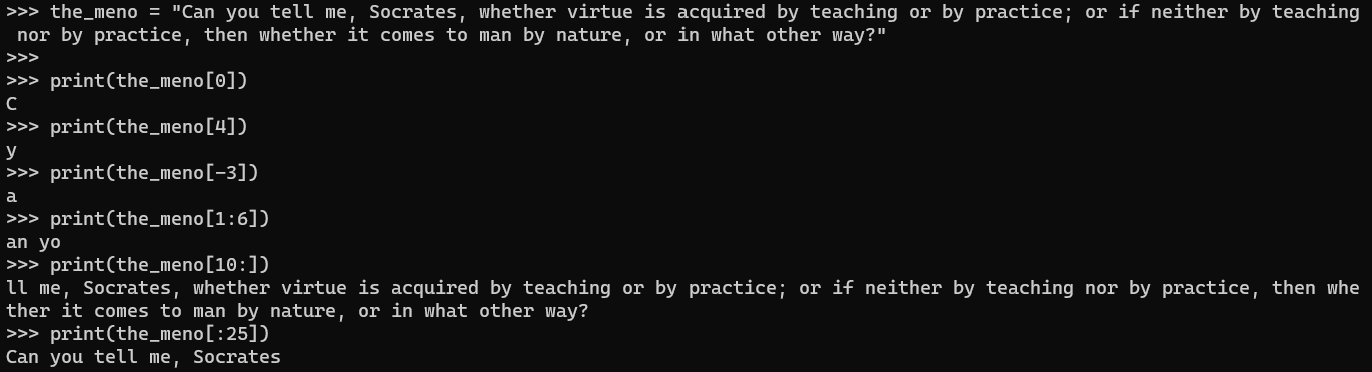
The process above is called indexing. To index a sequence like a string, we put square brackets after a string variable and then a number inside. This accesses the character at that spot in the string, counting from the beginning. Critically, you must remember that in Python, we start counting at 0. So the_meno[0] accesses the first spot in the string, and the_meno[4] accesses the fifth spot in the string. As we will learn later, indexing works with any sequence data type (like lists).
We can also access a large stretch of a string, a process called slicing. To slice a string, we use a colon. For example, the_meno[1:6] accesses the stretch of characters starting with the second character (remember, we start counting at 0, so the 1 before the colon means the second spot). The number after the colon indicates where we will stop, and the character at that number won’t be printed. So [1:6] means the second character through the sixth character. If you wanted to print the second word through the fourth word in the string (“you tell me”), what numbers would you use?
You can also use indexing to split a string at a particular location:
chomsky = "Colorless green ideas sleep furiously."
split_index = 10
chomsky1 = chomsky[:split_index]  # result is "Colorless "
chomsky2 = chomsky[split_index:] # result is "green ideas sleep furiously."
Lastly, you can also use string slicing to reverse a string (and the same syntax works with lists, as you’ll see later):
chomsky = "Colorless green ideas sleep furiously."
reversed_chomsky = chomsky[::-1]
print(reversed_chomsky) # result is ".ylsuoiruf peels saedi neerg sselroloC"
String functions and methods
Strings in Python are objects, and as with all built-in objects in Python, there are a number of functions and methods you can use with them. A quick note on terminology, a function is independent of an object and something we put the object in and get back some kind of data as a result. One example is the len() function. If we put a string into the len() function as below, we get back the length of the string (in characters).
the_meno = "Can you tell me, Socrates, whether virtue is acquired by teaching or by practice; or if neither by teaching nor by practice, then whether it comes to man by nature, or in what other way?"

# after the following line, meno_length = 186, the number of characters in the
# string
meno_length = len(the_meno)
In contrast to functions (which we pass the string into and get something back), methods are a part of the string object and define a bunch of useful things we can do with or to the string. Some commonly-used string methods are shown below:
# each of the below creates a new string, stored in x
# the first converts the first character to upper case.
# the second converts the first letter after each space to a capital
# changes the string stored in food
food = "pizza is 1st and ice cream is 2nd"
x = food.capitalize()  # result is x = "Pizza is 1st and ice cream is 2nd"
x = food.title()  # result is x = "Pizza Is 1St And Ice Cream Is 2Nd
x = food.upper()  # result is x = "PIZZA IS 1ST AND ICE CREAM IS 2ND"
x = food.lower() # result is x = "pizza is 1st and ice cream is 2nd"

# check if a character or letter is upper vs. lower case
letter = "a"
print(letter.isupper()) # False
print(letter.islower()) # True

# creates a new string 10 characters long, padded with spaces
food = "pizza"
x = food.ljust(10)   # result is x = "pizza     "
x = food.rjust(10)  # result is x = "     pizza"
x = food.center(10) # result is x = "  pizza   " since odd, extra space is at end

# .find() returns the position of the first occurrence of the searched character or -1 if not found
# .count() returns the number of times the searched character is in the string
# .replace returns a new string with the specified substitution
food = "pizza"
x = food.find("z")  # results in x = 2
x = food.count("i")  #  results in x = 1
x = food.replace("z", "s")  # results in x = "pissa"


# .strip() removes specified character from ends of string
# uses a space if none is provided
# useful for removing spaces and tabs
some_sentences = "  the dog chased the cat.\nthe cat chased the mouse. "
x = some_sentences.strip()
# result is x = "the dog chased the cat.\nthe cat chased the mouse."

# this would do nothing, since the . is not at the end of some_sentences
y = some_sentences.strip(".")

# but this would remove the . because the spaces had already been removed
y = x.strip(".")

# .split() splits a stsring into a list based on the specified character,
# uses a space if none is provided
# notice that it automatically removes the space
x = some_sentences.split()
# result is ['the', 'dog', 'chased', 'the', 'cat.', 'the', 'cat', 'chased',
#            'the', 'mouse.']


# works with newline characteres
x = some_sentences.split("\n")
# result is x = ['  the dog chased the cat.', 'the cat chased the mouse. ']
# but notice since we didnt split on spaces, the spaces were not removed.
# could fix by doing
x = some_sentences.strip()
y = x.split('\n')

# works with tabs too.
# Somewhat hard to read, but the sentence below has tabs for spaces
# tabs are and spaces are treated the same by .split()
another_sentence = "\tthe\tdog\tchased\tthe\tcat"
x = another_sentence.split() # result is x=['the', 'dog', 'chased', 'the', 'cat']
Concatenating strings
Strings can be concatenated by “adding” them
x = "dog"
y = "cat"
z = x + y  # result is z = "dogcat".
z = x + " " + y  # result is z = "dog cat"
z = x + "\n" + y
# result is:
"""
dog
cat
"""

# you can also "multiply" a string to get many copies of it
y = 4 * x  # result is y = "dogdogdogdog"
y = 4 * x + " "  # result is y = 'dogdogdogdog '
y = [4 * (x + " ")]  # result is y = "dog dog dog dog "

# the example below combines multiplication copying plus string slicing to
# remove the final space. the [:-1] says use everything except the last character
# but you have to use parentheses to enforce the right order of operations!
# if i left off the outer parentheses, the [:-1] would act on the (x + " "),
# removing the space, instead of acting on the entire 4 * (x + " ")
y = (4 * (x + " "))[:-1]  # result is y = "dog dog dog dog"
String formatting
There are many ways you can format strings in Python. We have already covered the string methods .ljust(), r.just(), and .center(). But there is a lot more we can do.
Let’s say we want to substitute variables in a string. We could use concatenation:
favorite_food = "pizza"
name = "Jon"
sentence = "My name is " + name + " and I like " + favorite_food + "."
But that can get complicated if there are many of them and limits our flexibility. Instead, we can use the .format() method:
favorite_food = "pizza"
name = "Jon"
sentence = "My name is {} and I like {}".format(name, favorite_food)
The .format() method looks for squiggly brackets, { }, in a string and then takes the variable names in the .format() parentheses and substitutes them in. For every pair of squiggly brackets, there must be a variable to go with them.
There are also a whole bunch of formatting options you can add:
name1 = "Jon"
food1 = "pizza"
rating1 = 10.0

name2 = "Andrew"
food2 = "strawberries"
rating2 = 7.625

header = "name food rating\n"
data1 = "{} {} {}\n".format(name1, food1, rating1)
data2 = "{} {} {}\n".format(name2, food2, rating2)
dataset = header + data1 + data2
print(dataset)

"""
The result would look like this:
name food rating
Jon pizza 10.0
Andrew strawberries 7.625
"""
What if we want things to line up a little better:
header = "{:10s} {:20s} {:5s}\n".format("name", "food", "rating")
data1 = "{:10s} {:20s} {:0.2f}\n".format(name1, food1, rating1)
data2 = "{:10s} {:20s} {:0.2f}\n".format(name2, food2, rating2)
dataset = header + data1 + data2
print(dataset)

"""
The result would look like this:
name       food                 rating
Jon        pizza                10.00
Andrew     strawberries         7.62
"""
Within each squiggly bracket, you can put all kinds of codes that affect the formatting. These almost all start with a colon (indicating to Python that what comes next is a string formatting code). The ‘s’ and ‘f’ tell Python that the data going there is a string or a float, respectively. The numbers tell Python something about how to format that data type. A number before a string indicator says to pad it with spaces out to that length (similar to using .ljust() ). A number before a float indicator tells Python how many significant digits to display. It will truncate the float or add extra zeros to make it the appropriate length.
However, my favorite way to format strings is using f-strings. All you have to do is put an f in front of the string, and then you can directly reference variables within the string by putting them inside curly braces. In fact, you can put any valid Python expression inside the curly braces, and it will be evaluated and substituted in. This makes the formatting much easier to read, but it is a Python feature that is relatively new (introduced in Python 3.6).
name1 = "Stefan"
food1 = "pizza"
rating1 = 10.0

name2 = "Andrew"
food2 = "strawberries"
rating2 = 7.625

sentence1 = f"{name1} likes {food1} with a rating of {rating1}"
sentence2 = f"{name2} likes {food2} with a rating of {rating2}"

print(sentence1)
print(sentence2)

"""
The result would look like this:
Stefan likes pizza with a rating of 10.0
Andrew likes strawberries with a rating of 7.625
"""

# formatting options
sentence3 = f"{name1} likes {food1.lower()} with a rating of {rating1:.3f}"
print(sentence3)

"""
The result would look like this:
Stefan likes pizza with a rating of 10.000
"""
There are many more string formatting options that can be read about here:
Exercise: Common string operations
What will each of the following expressions evaluate to? Make predictions before you try to run each line in the interpreter. Compare your predictions to the actual results — can you understand why your predictions differed from the actual results?
# String indexing and slicing
text = "Python Programming"
text[0]
text[-1]
text[7:11]
text[:6]
text[7:]
text[::-1]

# String methods
text.lower()
text.upper()
text.title()
text.count("o")
text.find("Pro")
text.replace("Python", "JavaScript")

# String formatting
name = "Alice"
age = 25
"{0} is {1} years old".format(name, age)
f"{name} is {age} years old"

# String concatenation and multiplication
"Hello" + " " + "World"
"Ha" * 3
"Python" + " " * 3 + "Programming"

# String methods with whitespace
message = "  Hello World  "
message.strip()
message.lstrip()
message.rstrip()
message.split()
Exercise Solution — expand only when you’re ready
# String indexing and slicing
text = "Python Programming"
text[0]      # 'P'
text[-1]     # 'g'
text[7:11]   # 'Prog'
text[:6]     # 'Python'
text[7:]     # 'Programming'
text[::-1]   # 'gnimmargorP nohtyP'

# String methods
text.lower()           # 'python programming'
text.upper()           # 'PYTHON PROGRAMMING'
text.title()           # 'Python Programming'
text.count("o")        # 2
text.find("Pro")       # 7
text.replace("Python", "JavaScript")  # 'JavaScript Programming'

# String formatting
name = "Alice"
age = 25
"{0} is {1} years old".format(name, age)  # 'Alice is 25 years old'
f"{name} is {age} years old"              # 'Alice is 25 years old'

# String concatenation and multiplication
"Hello" + " " + "World"        # 'Hello World'
"Ha" * 3                       # 'HaHaHa'
"Python" + " " * 3 + "Programming"  # 'Python   Programming'

# String methods with whitespace
message = "  Hello World  "
message.strip()    # 'Hello World'
message.lstrip()   # 'Hello World  '
message.rstrip()   # '  Hello World'
message.split()    # ['Hello', 'World']

# joining strings together
words = ["Hello", "and", "welcome", "to", "BCOG", "200"]
joined_words = " ".join(words) # you can join the words with an empty space
print(joined_words)  # 'Hello and welcome to BCOG 200'

# or you can join them with whatever separator you want
joined_words = ", ".join(words)
print(joined_words)  # 'Hello, and, welcome, to, BCOG, 200'
1.4. Numeric Data Types
Python has three basic number data types: int, float, and complex.
The int Data Type
An int is a whole number, positive or negative, of unlimited length.
x = 3
y = 23125123415431534234546
z = -1
The float Data Type
A “floating point number” is a positive or negative number containing one or more decimals. They can also be scientific notation.
x = 3.1415
y = -41.21367544352
z = 8.2e10
There are a few useful methods you can use with floats.
a = 4.5
b = a.as_integer_ratio()  # results in b = (9, 2)

a = 5.5
b = a.is_integer()   # return False, because a is not an integer
The complex Data Type
Complex numbers are numbers that use j to express the imaginary part.
x = 8+2j
y = 2j
z = -2j
1.5. Bool, Binary, and None Data Types
Bool Data Type
“Bool” variables (short for “Boolean”) are a special data type that stores the values True or False.
x = True
y = False
You can store the result of a comparison in a variable, resulting in it being a bool.
x = 5
y = 0
z = x > y  # this will store True in z, because x is greater than y
z = x == y  # this will store False in z, because x is not equal to y
z = x < y  # this will store False in z, because x is not less than y
Boolean expressions
A boolean expression is any expression that evaluates to either True or False. Comparisons like x > y or fruit_type == "apple" are common boolean expressions.
You can store boolean expressions in variables (as above), print them, and (soon) use them in if statements and combine them with logical operators like and, or, and not (see 1.6. Operators).
We haven’t covered operators yet (we will in 1.6. Operators), but note the important difference between a single equals sign (=) and a double equals sign (==) in Python. A single equals sign is used to assign the value in the variable on the right to a variable on the left, whereas a double equal sign is used to compare values or variables to see if they are the same.
Boolean variables can also be used the same way we cast (convert) variables to int(), str(), or float().
x = bool("dog")
y = bool(2)
When you cast with bool(), it almost always converts a variable to True, except in a small set of exceptions:
- Using
boolon a string always results inTrueunless the string is empty (i.e.,x = "") - Using
boolon a number (float,int, orcomplex) always evaluates toTrueunless the number is zero0 - Using
boolon empty collections (e.g., lists, sets, dictionaries) results in aFalse
These statements almost always evaluate to True, as in the examples above, which would then store True in the variables x and y. The only time using the bool() function would result in False is if the variable is None.
For more information about boolean types check out the official documentation: https://docs.python.org/3/library/stdtypes.html#boolean-operations-and-or-not
Binary Data Types
Python has a special set of data types for binary calculations: byte, bytearray, and memoryview. We are not going to cover them in this class, but more information is available here: https://www.pythonforbeginners.com/basics/bytes-in-python https://www.pythonforbeginners.com/data-types/bytearray-in-python https://www.geeksforgeeks.org/memoryview-in-python/
None Data Type
None is a special data type in Python that is used to specify an empty variable. None is not the same as zero 0, False, or an empty string "". It can be useful sometimes to initially set a variable to None and then change it later in a program. That way, you can have the variable from the beginning for testing purposes and test to see when it gets changed. None is also one of the few cases where casting as bool() results in False.
x = None

if x is not None:
    print("do something with x")
else:
    print("x is None, so there is nothing to be done")
1.6. Operators
Operators are a part of programming languages (and math) that are used to perform operations on a variable. Python has many kind of operators, we will cover the basics here and bring up others as they become relevant.
Arithmetic Operators
Arithmetic operators perform simpler arithmetic.
x = 3
y = 4

z = x + y  # addition, resulting in 7
z = x - y  # subtraction, resulting in -1
z = x * y  # multiplication, resulting in 12
z = x / y  # division, resulting in 0.75
z = x % y  # modulus (the remainder of division), resulting in 3
z = x // y  # floor division (division without the remainder), resulting in 0
z = x ** y  # exponentiation, resulting in 81
Assignment Operators
Assignment operators involve assigning a value to a variable. This includes the simple assignment (=). But assignment can also be combined with many of the other operators.
x = 12  # simple assignment

x += 5  # adds 5 to x, resulting in 17. shorter way of writing x = x - 4
x -= 5  # subtracts 5 from x, resulting in 7
x *= 5  # multiplies x by 5, resulting in 60
x /= 5  # divides x by 5, resulting in 2.4
x %= 5  # stores the remainder of x/5 in x, resulting in 2
x //= 5  # stores the non-remainder value of x/5 in x, resulting in 2
x **= 5  # stores 12 raised to the 5th power in x, resulting in 248832
Comparison Operators
Comparison operators compare two values or variables, and return a boolean (True or False).
x = 5
x == 7  # tests if x is equal to 7, and so evaluates to False
x != 7  # tests if x is not equal to 7, and so returns True
x > 7  # tests if x is greater than 7, and so evaluates to False
x < 7  # tests if x is less than 7, and so evaluates to True
x >= 7  # tests if x is greater or equal to 7, and so evaluates to False
x <= 7  # tests if x is less than or equal to 7, and so evaluates to True

y = [1, 2, 3]
z = [1, 2, 3]
y == z  # evaluates to True because the values are the same
y is z # evaluates to False because the variables point to different objects in memory== vs is
The double equals sign == is used to check whether two values are equivalent. The is operator, on the other hand, is used to compare the identities of two variables. In other words, == checks if the values are the same, while is checks if the variables point to the same object in memory. As we saw above:
y = [1, 2, 3]
z = [1, 2, 3]
y == z  # True
y is z  # False
You’ll use == to compare most types of values, but is comes up regularly, especially when working with objects, booleans, and None, especially when combined with conditionals (which we’ll learn more about in the next section).
x = None
if x is not None:
    print("x is not None")
Comparing strings lexicographically
You can also compare strings with <, >, <=, and >=. For strings, these comparisons are lexicographic (English dictionary-like): Python compares the first character of each string, then the next character if needed, moving left-to-right until it can decide which one comes first.
name1 = "Alice"
name2 = "Bob"
name1 == "Alice"  # evaluates to True because the strings match exactly
name1 != name2    # evaluates to True because the strings are different

# Lexicographic comparison (like in an English dictionary)
"cat" < "dog"     # evaluates to True because 'c' comes before 'd' in the alphabet
"cat" > "car"     # evaluates to True because 't' comes after 'r' in the alphabet
"cat" < "cats"    # evaluates to True because "cat" is shorter and matches up to its length

# Case matters! Capital letters come *before* lowercase in Unicode/ASCII
"Cat" < "cat"     # evaluates to True because uppercase 'C' comes before lowercase 'c'
"zebra" > "Zebra" # evaluates to True because lowercase 'z' comes after uppercase 'Z'

# Python compares strings character by character, left to right
"apple10" < "apple2"  # evaluates to False because '1' comes before '2' in ASCII
Logical Operators
Logical operators (e.g., and, or, and not) combine or modify boolean expressions (those that evaluate to True or False; recall
Chapter 1.5). Logical operators like and and or evaluate left-to-right and may stop early once the overall result is determined (this is called short-circuiting).
x = 5
y = 2
x < 5 and y < 5  # evaluates to False because it requires that both expressions be True, and the first is not
x < 5 or y < 5  # evaluates to True because at least one expression is True
not(x < 5 or y < 5)  # evaluates to False because it negates the value within parentheses
On truthiness
In Python (and many other languages) values can be “truthy” or “falsy”. Truthy values are those that are considered “True” in a boolean context, while falsy values are the opposite (they behave like “False”). This means that if you cast the value to a boolean, it will be True if the value is truthy, and False if the value is falsy. Here are some common examples:
- Truthy values:
- Any non-empty string (e.g.,
bool("dog")isTrue, as isbool("a")orbool("0")) - Any non-zero number (e.g.,
bool(1)isTrue, as isbool(0.001)) - Any non-empty collection (e.g., list, tuple, set, dictionary). For example,
bool([1, 2, 3])orbool(("a", "b", "c"))orbool({"a": 1, "b": 2, "c": 3})
- Any non-empty string (e.g.,
- Falsy values:
0(zero), sobool(0)isFalseNone, sobool(None)is alsoFalse- The empty string
"", sobool("")isFalse - Empty collections (e.g., empty list, tuple, set, dictionary), so
bool([])isFalse
Sometimes, however, truthy/falsy values behave quite differently from True and False themselves. For example, if used in the context of a Boolean expression (as with "cat" and "dog"), the and and or expressions evaluate to the first truthy/falsy value; they do not evaluate to True or False!
a = "cat" and "dog"   # x becomes "dog" (both are truthy, so it evaluates to the last value)
b = "" and "dog"      # y becomes "" (stops early because "" is falsy; doesn't bother evaluating the second value)

c = "cat" or "dog"    # c becomes "cat" (stops early because it's an `or` expression and `"cat"` is truthy)
d = "" or "dog"       # d becomes "dog" ("" is falsy, so it evaluates to the second value in an `or` expression)
Membership Operators
The membership operator tests to see if an element is in a collection (like a string, or lists, sets, and dictionaries as we will learn about later) and returns a boolean value.
x = "the dog chased the cat."
"g" in x  # will evaluate to True, because there is a "g" in the string x.
"dog" not in x   # will evaluate to False, because "dog" is in x, and not negates
Bitwise Operators
Python has many other operators for dealing with binary strings. We are not going to cover those in this class, but more information can be found here: https://realpython.com/python-bitwise-operators/.
Order of Operations
One useful thing to know is that in Python, order of operations follow strict rules so that you can look at a complex expression with multiple operations and know which comes first. This is like how in math, 3 + 4 * 2 is equal to 11, and not 14, because we do the multiplication before the division. But because there are many more operators in Python, the rules are more complex. The table below shows some of the most common operators, and the order in which they are evaluated.
| Operator | Description |
|---|---|
| ( ) | Parentheses are highest precedence |
| x[index] | Indexing a string or a list |
| ** | Exponentiation |
| -x | Negating a variable |
| * / // % | Multiplication, Division, Modulus, Floor Division |
| + - | Addition, Subtraction |
| & | Bitwise AND |
| ^ | Bitwise XOR |
| | | Bitwise OR |
| in, not in, is, is not | Identity and membership |
| ==, != | Testing equality |
| <, <=, >, >= | Comparison |
| not x | Boolean NOT |
| and | Boolean AND |
| or | Boolean OR |
| if-else | Conditional |
| = | Assignment |
Exercise: Operator Evaluation
What will each of the following expressions evaluate to? Make predictions before you try to run each line in the interpreter. Compare your predictions to the actual results — what did you get wrong? Can you trace the logic to figure out why things turned out different than how you expected?
# Arithmetic Operators
x = 10
y = 3
x + y
x - y
x * y
x / y
x % y
x // y
x ** y

# Assignment Operators
x = 5
x += 3
x -= 2
x *= 4
x /= 2
x %= 5
x //= 2
x **= 2

# Comparison Operators
a = 5
b = 7
a == b
a != b
a > b
a < b
a >= b
a <= b

# String Comparisons
"apple" < "banana"
"Apple" < "apple"
"cat" < "cats"
"10" < "2"

# Logical Operators
x = True
y = False
x and y
x or y
not x
not y
x and not y
not (x or y)

# Membership Operators
text = "Python Programming"
"Python" in text
"python" in text
"python" in text.lower()
"gram" in text
"Java" not in text

# Complex Expressions (Order of Operations)
2 + 3 * 4
(2 + 3) * 4
2 ** 3 * 4
2 ** (3 * 4)
10 / 2 * 3
10 / (2 * 3)
Exercise Solution — expand only when you’re ready
# Arithmetic Operators
x = 10
y = 3
x + y    # 13
x - y    # 7
x * y    # 30
x / y    # 3.3333333333333335 -- what a curious 5 at the end!
x % y    # 1
x // y   # 3
x ** y   # 1000

# Assignment Operators
x = 5
x += 3   # x == 8
x -= 2   # x == 6
x *= 4   # x == 24
x /= 2   # x == 12.0 -- note that this is now a float!
x %= 5   # x == 2.0
x //= 2  # x == 1.0
x **= 2  # x == 1.0

# Comparison Operators
a = 5
b = 7
a == b   # False
a != b   # True
a > b    # False
a < b    # True
a >= b   # False
a <= b   # True

# String Comparisons
# These all evaluate to True because the strings are lexicographically less than the strings they are compared to
# (e.g., "apple" comes before "banana" in the dictionary, 1 comes before 2, and so on)
"apple" < "banana"
"Apple" < "apple"
"cat" < "cats"
"10" < "2"

# Logical Operators
x = True
y = False
x and y      # False
x or y       # True
not x        # False
not y        # True
x and not y  # True
not (x or y) # False

# Membership Operators
text = "Python Programming"
"Python" in text          # True
"python" in text          # False
"python" in text.lower()  # True
"gram" in text            # True
"Java" not in text        # True

# Complex Expressions (Order of Operations)
2 + 3 * 4     # 14
(2 + 3) * 4   # 20
2 ** 3 * 4    # 32
2 ** (3 * 4)  # 4096
10 / 2 * 3    # 15.0 — again, a float!
10 / (2 * 3)  # 1.6666666666666667
1.7. Conditionals
An important part of all programming languages is a conditional statement, a branching where (usually) a comparison operator is used to decide if a particular piece of code should be run. In a conditional statement, each conditional test must end with a colon.
favorite_food = "pizza"

if favorite_food == "pizza":
    print("I am glad you like pizza!")
print("Pizza is my favorite food!")

if favorite_food == "broccoli":
    print("Broccoli is the most dangerous vegetable.")
    print("It tries to warn you with its terrible taste.")

if favorite_food == "apple_pie":
    print("Apple pie is pretty good!")
        print("It is certainly better than broccoli...")  # illegal! (see below)

elif favorite_food == "broccoli"):
    print("Ugh, broccoli! That's the deadliest vegetable!")
else:
    print("I don't have strong opinions about that food.")
The code that will execute if the conditional is True is typically on the following line, indented or spaced to the right. Python uses spaces and/or tabs to indicate which code “belongs in” the if statement. This makes Python unusual, as most languages use some kind of brackets or parentheses for this.
In the code above, the first print statement (“I am glad you like pizza!”) will only execute if “pizza” is stored in favorite_food because it is tabbed over. But the second print statement will execute no matter what because it is tabbed fully to the left. Because it is aligned with the if statement, not inside of it, it doesn’t “belong in” the if statement. In the second if statement, both print statements will execute because both are tabbed inside the if statement. The third if statement is actually an illegal statement because the two print statements are not tabbed the same amount. Python cares about tabs and spaces, and they must be used correctly.
Conditionals can be complex with multiple alternatives. When an if is followed by an elif, Python will treat this like saying, “if the previous condition is not true, then try this condition”. An else statement specifies what to do if none of the preceding if or elif statements are True.
favorite_food = "pizza"
if favorite_food == "pizza":
    print("I am glad you like pizza!")
elif favorite_food == "broccoli":
    print("Ugh, broccoli! That's the deadliest vegetable!")
else:
    print("I don't have strong opinions about that food.")
Note the important way the two examples below are different. In the first example, the first two conditionals are an if and elif, and so they are mutually exclusive. Python checks to see if the if is True first, and if it is, exits the conditional altogether without even checking to see if the elif is True. So in this example, only “This is a lucky number!” will print. In the second example, there are two if statements, so they are effectively independent, and the else statement belongs to the second if statement. In this case, both “That is a lucky number!” and “That is a single-digit positive number” print.
favorite_number = 7
if favorite_number == 7:
    print("That is a lucky number!")
elif 0 < favorite_number < 10:
    print("That is a single digit positive number")
else:
    print("I have nothing to say about that number")

if favorite_number == 7:
    print("That is a lucky number!")
if 0 < favorite_number < 10:
    print("That is a single digit positive number")
else:
    print("I have nothing to say about that number")
Embedded if-else Statements
Conditionals can be embedded inside each other. Just use the correct tabbing.
name = "Jon"
text_response = "My favorite food is pizza and I hate broccoli."

if "pizza" in text_response:
    if name == "Jon":
        print("Jon said something about pizza.")
    else:
        print("Someone not named Jon said something about pizza.")
else:
    if name == "Jon":
        print("Jon did not say anything about pizza.")
    else:
        print("Someone not named Jon did not say anything about pizza.")
Logical Operators and if-else Statements
Conditionals can also use logical operators to combine multiple comparisons (Boolean expressions; see Chapter 1.6).
favorite_food = "pizza"
name = "Jon"

if name == "Andrew" and favorite_food == "pizza":
    print("Andrew's favorite food is pizza")
    # the line above will not execute because both comparisons were not True


if name == "Andrew" or favorite_food == "pizza":
    print("Either the name is Andrew or the favorite food is pizza. Maybe both!")
    # the above statement will execute because at least one of the conditionals
    # is True

if name and favorite_food:
    print("Both the name and favorite food are truthy.")
else:
    print("One or more of the two values is falsy.")
Short-hand if-else Statements (Ternary Operator)
Above, we noted that in a Python conditional, the code that will be executed if the condition is True is usually on the next line, tabbed over. Python does allow you to do it all in one line:
print("Yay pizza!") if favorite_food == "pizza" else print("Boo pizza!")These “short-hand if” statements — aka, ternary expressions — are legal in Python, but they are usually dispreferred as a convention because they make the code less readable and are harder to edit if you end up needing to have multiple lines of code execute within the if or else block.
The Pass statement
The final thing to note is that if-else statements cannot be empty; they must have code inside them. The following code would get an error because nothing is tabbed inside the if:
a = 2
b = 5

if a > b:

print(a)
print(b)
However, if, for some reason, you need to have an empty if statement (or any other kind of statement that requires a tabbed-over code), you can use the pass statement. The pass statement is just a way of telling Python to do nothing if that conditional evaluates to True.
a = 2
b = 5

if a > b:
    pass

print(a)
print(b)
Pass statements are often useful as a way to temporarily get the code to run without an error if you haven’t figured out what you want to put inside the conditional.
Exercise: Conditional Statements
For each of the following code blocks, predict what will be printed. Make your predictions before running the code. Compare your predictions to the actual results — what did you get wrong? Can you trace the logic to figure out why things turned out different than how you expected?
# 1) Basic if statements
x = 5
if x > 3:
    print("x is greater than 3")
else:
    print("x is not greater than 3")

# 2) Branching logic
score = 85
if score >= 90:
    print("A")
elif score >= 80:
    print("B")
elif score >= 70:
    print("C")
else:
    print("F")

# 3) Nested if statements
name = "Everard"
age = 27
if name == "Everard":
    if age >= 18:
        print("Everard is an adult")
    else:
        print("Everard is a minor")
else:
    print("Not Everard")

# 4) Logical operators
x = 5
y = 10
if x > 3 and y < 15:
    print("Both conditions are true")
if x > 3 or y > 15:
    print("At least one condition is true")
if not (x > 3):
    print("x is not greater than 3")

# 5) Ternary operator
age = 20
print("Adult") if age >= 18 else print("Minor")

# 6) Pass statement
x = 5
if x > 3:
    pass
else:
    print("x is not greater than 3")
print("This will always print")

# 7) Complex nested conditions
score = 85
attendance = 0.75
if score >= 80:
    if attendance >= 0.8:
        print("Pass with good attendance")
    else:
        print("Pass but attendance needs improvement")
else:
    if attendance >= 0.8:
        print("Fail but good attendance")
    else:
        print("Fail and poor attendance")
Exercise Solution — expand only when you’re ready
# 1) Basic if-else
x = 5
if x > 3:
    print("x is greater than 3")  # This will print
else:
    print("x is not greater than 3")

# 2) Branching logic
score = 85
if score >= 90:
    print("A")
elif score >= 80:
    print("B")  # This will print
elif score >= 70:
    print("C")
else:
    print("F")

# 3) Nested if statements
name = "Everard"
age = 27
if name == "Everard":
    if age >= 18:
        print("Everard is an adult")  # This will print
    else:
        print("Everard is a minor")
else:
    print("Not Everard")

# 4) Logical operators
x = 5
y = 10
if x > 3 and y < 15:
    print("Both conditions are true")  # This will print
if x > 3 or y > 15:
    print("At least one condition is true")  # This will print
if not (x > 3):
    print("x is not greater than 3")

# 5) Ternary operator
age = 20
print("Adult") if age >= 18 else print("Minor")  # Will print "Adult"

# 6) Pass statement
x = 5
if x > 3:
    pass  # The pass statement does nothing
else:
    print("x is not greater than 3")
print("This will always print")  # This will print

# 7) Complex nested conditions
score = 85
attendance = 0.75
if score >= 80:
    if attendance >= 0.8:
        print("Pass with good attendance")
    else:
        print("Pass but attendance needs improvement")  # This will print
else:
    if attendance >= 0.8:
        print("Fail but good attendance")
    else:
        print("Fail and poor attendance")
1.8. Lab 1
'''
This lab is a Python file and should run and execute like a Python file. Copy and paste the contents of this file into a new "lab_1.py" file of your own and make the necessary edits.
Your TA will grade the file by running it and reading your answers.
So please make sure that the file runs without getting an error and prints out the correct answers.

Some questions will be like question 1, asking you to explain something. Make sure your answer prints out when you run
the program.

Sometimes the question may ask you to modify or write some code that executes and perhaps to explain the code.

Make sure that the file you turn in runs without errors. If the script cannot run, your TA won't grade the assignment
and you will get a 0.
'''


"""
1) What is the difference between a variable, a statement, and an expression in Python?" Save your answer as a string
variable. Then create a print statement that prints out a "1) " and then prints your answer. The result should look
like this: "1) MY ANSWER HERE."
"""
# YOUR CODE FOR 1) GOES HERE

"""
2) One of the lines below will generate an error when uncommented. Change that line and any other lines that
you need to so that the output of the print statement looks exactly like the line below, including the '2)'
and the space after it:

2) bcog bcog bcog

Please ensure that there are no additional spaces at the beginning or end of the output —
we will check for extra spaces!

You must use string multiplication. Do not just type "bcog" three times. Here's the
code you will need to use and change, so copy and paste it below as needed:

x = bcog
y = 5
z = x * y
print(z)
"""
# YOUR CODE FOR 2) GOES HERE


"""
3) What is wrong with the following variable declarations:
    a) 1st_favorite_food = "pizza"
    b) Favorite_Food = pizza (2 problems)
    c) favfd = "pizza" (1 problem)

Create a print statement for your answer that looks like this, including the '3)' and the space after it:

3) Variable naming problems
    a) YOUR ANSWER
    b) YOUR ANSWER
    c) YOUR ANSWER

(There is no need to provide "corrected" code here — I just want your explanation
for why the code as written doesn't work.)
"""
# YOUR CODE FOR 3) GOES HERE


"""
4) The code below does not print out 20. Print out an explanation of why not, and change the code (while keeping the
multiplication) so that it does. Create a print statement that has your answer after a 4), and then print m with 20 as
the output.
"""
p = 5
q = '4'
m = p * q
print(m)


"""
5) What is an operator? Also, explain each kind of operator below and give an example. Create a print statement with
your answers that look like this (the top row is the header; I'm not asking for a definition of "term" as well):

| Term        | Definition      |
| Operators   | YOUR_DEFINITION |
| arithmetic  | YOUR_DEFINITION |
| comparison  | YOUR_DEFINITION |
| assignment  | YOUR_DEFINITION |
| logical     | YOUR_DEFINITION |
| identity    | YOUR_DEFINITION |

The rows can take up multiple lines, but make sure the | symbols line up so it looks like a nicely formatted table.
Use string formatting to make everything line up (recall section 1.3 on string formatting).
"""
# YOUR CODE FOR 5) GOES HERE

"""
6) For each variable `result1` through `result5`, create a print statement explaining what value
will end up stored in that variable. It should look exactly like this:

    - result1 will be ANSWER because YOUR EXPLANATION
    - result2 will be ANSWER because YOUR EXPLANATION
    - result3 will be ANSWER because YOUR EXPLANATION
    - result4 will be ANSWER because YOUR EXPLANATION
    - result5 will be ANSWER because YOUR EXPLANATION

"""
X = 0
Y = 1
A = '0'
B = 'dog'
C = ''
result1 = X or Y
result2 = X and Y
result3 = X or A
result4 = A and B
result5 = not A and B and C
print("6)")
# YOUR CODE FOR 6) GOES HERE


"""
7) For the string below, write code that does the following:
    - Capitalizes the first letter of each word and prints the result
    - Capitalizes the last letter of each word and prints the result
    - Uses the replace method to replace the word 'machines' with the word
        'animals', and prints the result
    - achieve the same result using string slicing and concatenation, and prints
        the result

We are not asking you to brute force this by manually editing the string! You should be able
to do this with string methods (or other methods we will learn about later).
"""
skinner = "the question is not whether machines think, but whether people do"
print("7)")
# YOUR CODE FOR 7) GOES HERE


"""
8) For the string below, write code that does the following:
    - use code (do not manually edit) the string so that it prints out with each
      word on its own line, and print the result
    - without splitting the string, use code to print out how many words are in
      the string
"""
descartes = "Thus having fully weighed every consideration, I must finally conclude that the statement \"I am, I exist\" must be true whenever I state it or mentally consider it."
print("8)")
# YOUR CODE FOR 8) GOES HERE


"""
9) Write code below that uses a conditional to print out either "Yes, the string is more than 50 characters,
it is X characters", where X is the length of the string, or prints out "No, the string is less than 50 characters,
it is X characters", or else prints out "The string is exactly 50 characters". The code should only end up printing
out the correct answer depending on the length of the string.
"""
chomsky = "Colorless green ideas sleep furiously."
print("9)")
# YOUR CODE FOR 9) GOES HERE


"""
10) In the following code, create a print statement that prints an explanation of why the output is what it is.
Then create a second print statement explaining what values you would need to change the variables to so that the
conditional printed out "else-if".

"""
x = 15
y = 40
z = -1
a = "cat"
b = "dog"
c = "egg"
if x > 20 and y != z:
    if a > b:
        print("if-if")
    elif b > c:
        print("if-elif")
    else:
        print("if-else")
else:
    if a > b:
        print("else-if")
    elif b > c:
        print("else-elif")
    else:
        print("else-else")
print("10)")
# YOUR CODE FOR 10) GOES HERE