
Chapter 3 — Functions
3.0. Functions
The concept of a function is one of the most important in computer programming. A function is a block of code that only runs when it is called. Functions often take input data (called parameters) and either execute some action (like printing data to the screen or a file) or else return some kind of data back to where the function was called.
One of the main advantages of using functions in computer code is that when you have a certain block of code that you will need to use many times, you can turn that code into a function. Then you can call that function over and over instead of needing to retype and duplicate the code each time you want that code to run.
We’ve already used many functions (such as print() and sum()), and we can use them to illustrate the point. If you have two lists of numbers like x = [1, 2, 3, 21, 32] and y = [51, 32, 1], you could write two different loops, one that sums the first list and a second that sums the second list. To eliminate this need for redundant code for such a commonly used operation, python has implemented the sum() function. Functions save a lot of time. There are many such built-in functions, but in this chapter, we are going to focus on creating your own.
Functions have many advantages that should make you want to use them all the time. In addition to making it so you don’t have to rewrite code many times, functions make your code much more concise and well-organized. It also makes your code much easier to debug. Imagine you have a block of code that you are re-using multiple times, and you discover there is a mistake in it. If that code is in a function, you only have to make one change to the function. If, instead, you have rewritten the code in several places, then you need to make the change in each one of those places.
In Python, functions are easy to create. Let’s show a simple example.
def print_favorite_food(name, favorite_food):
    print(f"Hello! {name}")
    print(f"Your favorite food is {favorite_food}!")

print_favorite_food("Jon", "pizza")

first_name = "Jessica"
food = "noodles"
print_favorite_food(first_name, food)
The code above creates the print_favorite_food function. The print_favorite_food function has two parameters, a variable called name and a variable called favorite_food.
Functions, like if statements and loops, use indentation to denote what code “belongs to” the function. Each time the function is called, the code inside the function executes. This is an important point; the code that you put inside a function does not execute until that function is used. The Python interpreter, when it sees a function definition (a line that starts with def), makes note that the function exists and then effectively ignores all further indented lines inside the function until the function is used. Then it goes back and executes those lines of code.
Passing variables into functions
Note that when the function is used, values need to be passed into the function that correspons to those in its definition. They can be hard-coded values, as in the first example, or they can be variables that contain values, as in the second example. Also note that if a variable is put into a function, it does not have to be named the same thing as the variables defined inside the function. In fact, it is considered good programming practice to name variables inside and outside a function with different names so that they don’t get confused. But this is just a convention; unless the variables are explicitly declared as a “global” variable, the variables inside a function are completely independent of any outside of the function. We will discuss this issue more in later sections.
Function naming rules and conventions
A final thing to consider regarding functions is the rules and conventions for how they should be named. Remember that the rules MUST be followed; violating the rules will generate a syntax error. The rules for function names are pretty simple:
- they must start with a
def, - have a space between
defand the name - have parentheses after the name (even if no parameters are defined for the function, you still put empty parentheses)
- end with a colon
- like all other rules for variable names in Python, they cannot start with a number or special character
One other thing to beware of is that you should be careful about using names that are already defined as functions in python. This will not generate an error, but it will mean that you are redefining that word to do what your function does from that point on, and the Python-predefined version of that function will no longer be available.
As far as conventions go, there are several conventions for Python functions (habits you should develop for naming functions, even if they don’t generate an error):
- name them like variables
- using lowercase descriptive words that mean something
- if you use more than one word, separate them by underscores (snake case)
- differentiate variable names and function names by using nouns for variables and verbs for functions. Remember that variables are objects, so noun names make sense. In contrast, the functions “do something”, so it makes sense to use a verb as their name.
Lambda functions
Lambda functions, also known as anonymous functions, are small, single-expression functions that can be created inline without using the def keyword. They are useful when you need a simple function for a short period of time and don’t want to define a full function using def. Lambda functions can have any number of parameters but can only contain a single expression, which is immediately returned.
Here’s the basic syntax of a lambda function:
lambda parameters: expressionLet’s compare a regular function that adds two numbers to a lambda function that does the same thing:
# Regular function
def add(x, y):
    return x + y

# Using the function
print(add(5, 3))  # Output: 8

# Lambda function -- this is the same as the regular function above
add = lambda x, y: x + y # notice that we don't use the `return` keyword! It's implicit.

# Using the lambda function
print(add(5, 3))  # Output: 8 -- the same as the regular function
Lambda functions are particularly useful when you need to pass a simple function as an argument to another function. A common use case is when sorting collections, or with list operations like map() and filter():
# Sorting a list of tuples by the second element
pairs = [(1, 'one'), (2, 'two'), (3, 'three'), (4, 'four')]
sorted_pairs = sorted(pairs, key=lambda pair: pair[1])
print(sorted_pairs)  # Output: [(4, 'four'), (1, 'one'), (3, 'three'), (2, 'two')]

# Using lambda with map() to square numbers
numbers = [1, 2, 3, 4, 5]
squared = list(map(lambda x: x**2, numbers))
print(squared)  # Output: [1, 4, 9, 16, 25]
While lambda functions are convenient, they should be used sparingly. For more complex operations, it’s better to use regular functions defined with the def key word. Lambda functions are best suited for simple operations that can be expressed in a single line of code.
3.1. Passing arguments into functions
As we noted, it is common to pass data into a function. You will sometimes hear these called parameters and sometimes hear them called arguments. The terms technically mean slightly different things. We call the variable that is defined in the function a parameter, and we call it an argument when we are talking about the actual values that are assigned to those variables when the function is called. Consider, for example, the following function for computing and printing out some properties of a circle:
def print_circle_info(x, y, radius):
    center = (x, y)
    pi = 3.1415

    circumference = 2 * pi * radius

    area = pi * radius**2

    top_tangent_point = (x, y - radius)
    bottom_tangent_point = (x, y + radius)

    print(f"Your circle has an area of {area:0.3f} and a circumference of {circumference:0.3f}")
    print(f"The center of the circle is {center}")
    print(f"It's top and bottom tangent points are {top_tangent_point} and {bottom_tangent_point}")


center = (5, 3)
the_radius = 4
print_circle_info(center[0], center[1], the_radius)
The print_circle_info function has three parameters: the x and y coordinates at the middle of the circle and its radius. The values 5, 3, and 4 are what we would consider the current arguments of print_circle_info when it is called on the last line of the code above.
Because the function has three parameters, every time the function is called, it must be supplied with three arguments. This is the default behavior for Python functions; the number of parameters and the number of arguments must match. The arguments that are passed into the function are assigned to the parameters in the order that they are specified. If one should accidentally screw up the order of the arguments by doing the following:
print_circle_info(the_radius, center[0], center[1])Then, in the current code, Python would have no way of knowing that the_radius was supposed to be assigned to the third parameter. It isn’t smart like that, and it can’t match the names. It just matches them up by order. So, in this case, the value in the_radius (4) would get assigned to x, the value in x (5) would get assigned to y, and the value in y (3) would get assigned to the radius.
As a general rule, the number of arguments (values passed in) and parameters (variables defined in the function definition) must match. But there is one important exception which we will discuss next.
Default arguments for parameters
You can define a function to have a default value for a parameter in the event that it is not specified. This is an optional parameter:
def print_location(location="Champaign"):

    print(f"You live in {location}!")

print_location()

city = "Urbana"
print_location(city)
In the example above, when the parameter location is defined inside the function, the parameter is also assigned a value. This value will be automatically assigned to the variable if that argument is not passed into the function. So in this example, we have a function with a single optional parameter, and so it can be called with either one or zero arguments provided.
It may occur to you that if you can have parameters with default arguments, then that creates a confusing situation when you mix parameters with and without defaults. Parameters without defaults match the arguments to the parameters in the order they are supplied, and so optional arguments would screw this up because it would make the order or the arguments unpredictable. For this reason, Python requires that all parameters without arguments be defined first, and optional arguments come after that. See the example below.
def print_personal_info(first_name, last_name, species="Human", favorite_food=None):
    print(f"Hello {first_name} {last_name}.")

    # check to see if the species name starts with a vowel, so we use the correct article before it
    if species[0] in ['A', 'E', "I", "O", "U", "a", "e", "i", "o", "u"]:
        article = "an"
    else:
        article = "a"

    print(f"I see that you are {article} {species}.")

    if favorite_food:
        print(f"I also see that your favorite food is {favorite_food}.")
    else:
        print("I do not know what your favorite food is.")

print_personal_info("Edward", "Cullen", "vampire", "blood")
print_personal_info("Jon", "Willits", favorite_food="pizza")
print_personal_info("Nerwen", "Galadrial", favorite_food="lembas bread", species="elf")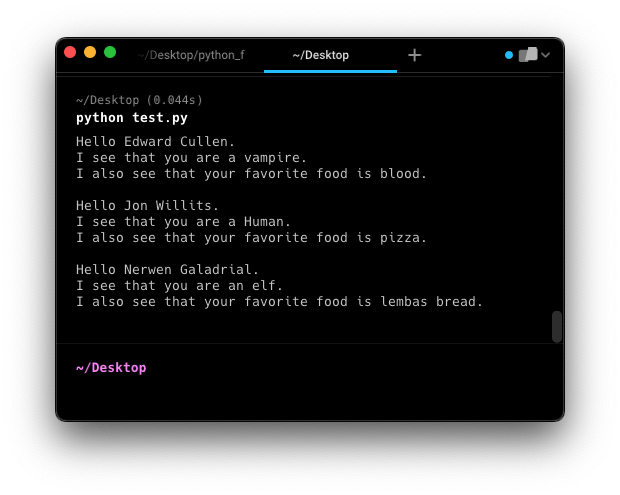
print_personal_info()In this example, we have a function that prints some information about a person. The function has two required parameters (first_name and last_name) and two optional parameters (species and favorite_food). In the function definition, the optional parameters must come at the end of the sequence of defined parameters.
Notice that when the functions are called, there are options about how to provide arguments.
- In general, the required arguments must come first
- If the optional arguments are provided in the order they are defined (like in the first example), you don’t need to specify the parameter names; they work just like normal parameters
- If you want to provide an optional argument that is not the next one in the definition order, then you must specify the parameter’s name (as in the second example)
- You can specify any of the optional arguments in any order as long as you use the parameter name when you call the function (as in the third example)
- However, if you must specify your arguments out of order, then you must specify every parameter name, as below:
print_personal_info(species="vampire", last_name="Cullen", favorite_food="blood", first_name="Edward")There is another useful detail worth pointing out in this example. If you define a function with optional parameters, you can assign any kind of variable as the default. In the case of the species above, we supplied a string. But in the case of favorite_food, we provide the value None. Remember that None is a special kind of variable type all of its own. It is common in defining functions with optional variables to declare its default value as None, because that allows us to perform a simple boolean check to see if the variable has a value, as we do in this function. When we use the command if favorite_food:, if favorite_food is None, the if statement evaluates as False. That allows us to set up a nice bit of code that will run as a default if one of our variables doesn’t have a value.
Positional-only and keyword-only arguments
What if you wanted to force the user to pass arguments by position or by keyword? Luckily, Python 3 introduced special syntax for defining positional-only and keyword-only arguments in functions. These features allow you to control exactly how arguments must be passed to your functions.
Positional-only arguments
Positional-only parameters are defined before a / in the parameter list and must be specified by position, not keyword:
def divide(x, y, /, result_type="float"):
    # Perform floating-point division if `result_type == "float"`,
    # otherwise perform integer division
    # note: `x` and `y` must be passed positionally
    # note: `result_type` can be passed by either position or keyword
    # note: `result_type` defaults to "float"
    return x / y if result_type == "float" else x // y

divide(10, 3)  # Valid
divide(x=10, y=3)  # Oops! `x` and `y` are positional-only; they can't be passed by keyword!
Keyword-only arguments
Keyword-only parameters are defined after a * or *args and must be specified using keywords:
def greet(*, name, greeting="Hello"):
    # `name` and `greeting` must be passed by keyword
    # In this case, `name` has no default value, while `greeting` does.
    print(f"{greeting}, {name}!")

greet(name="Alice")  # Valid
greet(greeting="Hi", name="Alice")  # Valid! Keyword arguments ignore order
greet("Alice")  # Oops! `name` was passed positionally; it must be passed by keyword!
These features help make function interfaces more explicit and prevent confusion about how arguments should be passed. While you may not need to use these features often in your own code, you may encounter them out in the wild — it’s good to know they exist.
3.2. Return values
Another common property of functions is that they return one or more values. You have encountered a number of these functions so far, such as sum() and len(), two built-in functions that take an input (like a list and a sum, respectively), and give you back either the sum of the list or the length of the sequence.
The way you make your function return a value is to use a “return” statement.
def calculate_circle_area(radius):
    pi = 3.1415
    area = pi * radius**2

    return area

the_area = calculate_circle_area(10)  # returns the value 314.15, i.e. 10^2 * 3.1415
Functions that don’t return a value
Functions that don’t have return statements still technically return a value: None.
def print_the_cube(x):
    y = x**3
    print(f"The cube of {x} is {y}")

the_function_result = print_the_cube(4)
print(the_function_result)   # this will print None, since the function doesn't actually return a value
The example above is an issue you run into sometimes by mistake. If you have an error that says, “you can’t do that to a NoneType variable”, or you print a variable of your own, and it is unexpectedly None, you probably assigned the output of a function that doesn’t return a value to a variable by mistake. For example:
x = print("Pizza")  # print() doesnt return a value, so None is now stored in x

import tkinter as tk

main_window = tk.Tk()
# the .pack() function doesn't return a value, and so instead of assigning the quit button object to the quit_button
# variable, the line below is assigning the result of the pack() command.
quit_button = tk.Button(main_window, text="Quit", command=main_window.destroy).pack()

# Do this instead:
quit_button = tk.Button(main_window, text="Quit", command=main_window.destroy)
quit_button.pack()
Functions that return multiple values
Functions can return multiple values; you just do them in order the same way you pass variables into a function. This yields a tuple, which we can then assign to multiple variables at once via tuple unpacking (recall that section from Chapter 2, Section 6: Tuples).
def get_name():
    first_name = input("Please type your first name: ")
    last_name = input("Please type your last name: ")
    return last_name, first_name

last_name, first_name = get_name()
The number of variables being returned, and the number of variables being received, generally need to match up. There is one exception to this rule: Python will let you convert a set of variables into a tuple:
# this function returns two variables separately
def get_name1():
    first_name = input("Please type your first name: ")
    last_name = input("Please type your last name: ")
    return last_name, first_name

# this function explicitly creates a tuple and then returns the tuple as a single variable
def get_name2():
    first_name = input("Please type your first name: ")
    last_name = input("Please type your last name: ")
    name_tuple = (last_name, first_name)
    return name_tuple

# here, we only have one variable to recieve the output of the function, so python will automatically pack
# the variables into a tuple — this is called "tuple packing", the inverse of tuple unpacking
name_tuple = get_name1()
print(name_tuple)  # will output ("lastname", "firstname"), using whatever names you typed

# here everything was explicitly turned into a tuple, so it behaves exactly as you would expect
name_tuple = get_name2()
print(name_tuple)

# here, a tuple was being returned, and you can instead unpack that tuple into separate
# variables as long as the number matched.
last_name, first_name = get_name2()
print(first_name, last_name)

# But if you tried to add a third variable here, you would get an error
last_name, first_name, middle_name = get_name2()
print(first_name, last_name)
3.3. Local and global variables
Now that we have introduced functions, we can talk a bit more about global versus local variables.
A really important concept in programming language is the difference between local and global variables. What these terms mean is a difference in where a variable can be accessed. A global variable is one that can be accessed anywhere in the program. A local variable is one that can only be accessed inside functions that have been directly given access to that variable. This mainly comes into play with functions and classes (which we will learn about later). Let’s demonstrate with an example.
def print_personal_info(first_name, favorite_food):
    print(f"{first_name}'s favorite food is {favorite_food}.")

name = "Jon"
food = "pizza"
print_personal_info(name, food)
The code above looks just like what we’ve dealt with so far. There are two variables defined and passed into the function. But this code would work too:
def print_personal_info():
    print(f"{name}'s favorite food is {food}.")

name = "Jon"
food = "pizza"
print_personal_info()
Here, we don’t pass the variables in at all. And yet the function still knows what is stored in the variables name and food. What gives? The explanation is that name and food are global variables because they are defined outside any function. Any variable that is created outside a function is a global variable that is accessible inside any function, as long as that function doesn’t have another variable inside of it declared with the same name.
In contrast, the following two examples would not work:
def assign_personal_info():
    name = "Jon"
    food = "pizza"

assign_personal_info()
print(f"{name}'s favorite food is {food}.")
The code above would give you an error. The variables name and food are declared inside the function, not at the global level. This means that they are still technically undefined (at the global level) when they are used in the print statement. This could be fixed by adding a return statement to the function and returning those two variables:
def assign_personal_info():
    name = "Jon"
    food = "pizza"
    return name, food

name, food = assign_personal_info()
print(f"{name}'s favorite food is {food}.")
This next bit of code would generate an error as well. It has the same problem. The variables name and food are defined inside a function, and so are not global.
def assign_personal_info():
    name = "Jon"
    food = "pizza"

def print_personal_info():
    print(f"{name}'s favorite food is {food}.")

assign_personal_info()
print_personal_info()
If you want another function to have access to them, you would need to pass them to that function like this:
def assign_personal_info():
    name = "Jon"
    food = "pizza"
    return name, food

def print_personal_info(name, food):
    print(f"{name}'s favorite food is {food}.")

name, food = assign_personal_info()
print_personal_info(name, food)
The first function returns the variables, and then they are passed into the next function.
Why bother passing variables, instead of using global variables?
Passing variables between functions sounds like a pain. Why not just make every function a global function? There are many reasons we don’t want to do this.
The main reason is that we may have different functions that are all doing different things with the same variable; it can be very hard to keep track of which ones are changing the value of the variable, which ones are using it, and if the variable will be the value you expect it to be when it is used. Forcing variables to be passed around is a way to enforce structure in the program. If you want to know exactly what a function does, you want to be able to know exactly what the states of the variables are that the function is using. Global variables tend to make that a lot harder.
But remember what we said earlier about rules stating that there is a “right way to do something”. There are no rules, and this is true for global variables as well. The main principle is that you are trying to make your code clear and simple. There are times when using a global variable is the easiest, or even the only, way to solve a problem. But usually, global variables make programs harder to understand, and they should be avoided unless you have a good reason for using them[^1].
3.4. The main() Function
Now that we understand functions and global vs. local variables, we can introduce something important: the main() function. It is very common and considered good practice to have all of your python scripts have a structure like that below:
# your import statements here

def example_function(x):
    y = x**2
    return y

def main():
    result = example_function(25)
    print(result)

if __name__ == "__main__":
    main()
You should have only four kinds of things defined at the global level of your script:
- Import statements at the very beginning of the file
- The
main()function definition - Any other functions you define and that are called from inside other functions (including
main()) - An if statement exactly like the one above
So what is up with that if statement? Let’s start by thinking about what this script would be like without it and with the main() function call inside the if statement being outside of it and tabbed fully to the left. In this case, when the Python interpreter reads the file, it would note (but not execute) the definition of each function, including the main(). Then it would get to that last line and see the main() function called, and so execute the main() function, which would, in turn, call the other functions you define.
One advantage of organizing your scripts like this is that the functions inside it can be reused in other scripts. The exact same way that we learned to do import tkinter and use all its functionality, we can do with our own scripts. If we write a function (or set of functions) we like, we can import our own script and access the functions.
But if the main() function was called at the global level outside the if statement we have above, then the entire script would execute if you tried to import it into another file. But having the main() function call inside this if statement, the main() function will execute if this script is run directly in Python but will not run if this script is imported into another script.
In brief:
- If you want to run a script, you can call
python my_script.py - If you want to import a script, you can do
import my_script - By using
if __name__ == "__main__": main(), you can ensure that themain()function will execute if the script is run directly withpython my_script.py, but not if it is imported (as withimport my_script).
For more information, if you are interested, you can read this: https://realpython.com/if-name-main-python/
3.5. An example program
In this section, we are going to create a simple Tkinter program that implements a little virus-spreading simulation. What we are going to do is build a little game-like window that has little simulated “people” running around. In computational modeling, we usually refer to the entities in such simulations as “artificial agents”, or just “agents” for short, and we call a simulation like this “agent-based modeling”.
In the simulation, we want to implement the following functions
- A main function that defines our simulation parameters and calls the functions below
- Functions for the user interface of the simulation
- Creating the main window
- Creating the frame and canvas that will display the simulation
- Creating the frame for the user interface buttons
- A start/stop button that activates or pauses the simulation
- A quit button that exits the simulation
- Functions for the simulation itself (which are all independent of the GUI)
- A function to create the list of agents
- A function to describe what happens at each time step in the simulation, which calls the following functions for each agent:
- Move_agent, which moves each agent around the simulation display
- Update agent, which updates the properties of the agent
- Checking to see if the agent gets infected by nearby agents
- If infected or immune, updates the infection and immunity counters
And that’s it. Let’s get started! The first thing I always recommend for a complex program like this is to outline it above. Describe in English, not Python, what the program needs to do and what its structure will be. Then create a skeleton program with the functions created but not implemented. Then you can fill in the code of the functions one by one and test each one to make sure that it works as intended.
Creating the main() function
Now let’s create the main function and define our simulation parameters. You’ll notice that, in addition to importing tkinter, we import two other modules in this program: time and random. Time allows us to do some time-related stuff, and random allows us to generate random numbers. As for the rest of the parameters, they are explained in the comments.
import tkinter as tk
import time
import random

def main():
    WINDOW_DIMENSIONS = (1200, 800)  # this size of the overall window
    SIMULATION_DIMENSIONS = (1200, 700)  # the size of the simulation part of the window

    NUM_AGENTS = 100   # the number of agents in the simulation
    MOVEMENT_SPEED = 20   # how many pixes each agent will move in a single turn
    INFECTION_DISTANCE = 100   # how close two agents have to be to have a chance at infecting each other
    INFECTION_CHANCE = .5  # the probability agents will infect each other if within the distance
    INFECTION_DURATION = 20   # how many turns an agent stays infected (and contagious)
    IMMUNITY_DURATION = 30   # how many turns an agent is immune from infection after getting infected

    # the options above are bundled into a tuple, so we only need to pass one variable around
    OPTIONS = (NUM_AGENTS, MOVEMENT_SPEED, INFECTION_DISTANCE, INFECTION_CHANCE, INFECTION_DURATION, IMMUNITY_DURATION)

    agent_list = create_agent_list(SIMULATION_DIMENSIONS, OPTIONS)

    main_window = create_simulation_display(WINDOW_DIMENSIONS, SIMULATION_DIMENSIONS, agent_list, OPTIONS)
    main_window.mainloop()

running = False
That’s it. We could, instead of creating the tkinter window, create a loop in that main function called the take_turn() function (that we will create below) over and over. Then the simulation would run in a virtual fashion (sometimes called “headless” mode) without a visual display. This can be useful when we want the simulation to run quickly and we don’t want to watch it. But if we want to watch it, we need to create a visual interface. So let’s do that next.
Creating the simulation functions
Next, let’s create the simulation functions one by one. Starting with create_agent_list(). Each agent in our simulation is going to be its own list of five properties:
- x-coordinate
- y-coordinate
- Agent size (in pixels)
- Days of infection remaining (or zero if uninfected)
- Days of immunity remaining (or zero if not immune)
We’ll generate the x and y coordinates for each agent randomly, using the random.randint() function. This function takes two numbers (min and max), and it will generate a number between those two, inclusive (i.e., the min and max values can be one of the random numbers chosen).
We’ll set the infection and immunity values to zero for all the agents except one, our patient zero. Hey, immunologists start counting at zero, just like Python!
So we create a for loop that iterates num_agents amount of times (which we stored in options). We create our list of properties for each agent and then add that list to the agent list. We then choose one of our agents to infect and set their infection_duration and immunity_duration values to whatever we had set in the options in the main() function. When we’re done, we’ll return the agent_list.
def create_agent_list(dimensions, options):
    '''
    this function will create the agent_list.
    It will need to know the dimensions and the options
    It will need to return the agent_list back to the main program
    '''
    num_agents = options[0]
    infection_duration = options[4]
    immunity_duration = options[5]

    agent_size = 20
    agent_list = []

    for i in range(num_agents):
        x = random.randint(agent_size, dimensions[0]-agent_size)
        y = random.randint(agent_size, dimensions[1]-agent_size)
        agent = [x, y, agent_size, 0, 0]
        agent_list.append(agent)

    patient_zero_index = random.randint(0, num_agents-1)
    patient_zero = agent_list[patient_zero_index]
    patient_zero[3] = infection_duration
    patient_zero[4] = immunity_duration

    return agent_list
Next, let’s make the take_turn() function, where all the action happens. But it’s very simple. We just want to loop through our list of agents and do two things: call the move_agent() function and the update_agent() function (which updates each of the agent’s infection and immunity values.)
def take_turn(agent_list, dimensions, options):
    '''
    This function will specify what happens to each agent on each turn.
    It will need the agent list, the dimensions, and the options
    It will need to return the updated agent_list back to the main program
    '''
    for i in range(len(agent_list)):
        move_agent(agent_list[i], dimensions, options)
        update_agent(i, agent_list, options)

    return agent_list
Now let’s create the move_agent function. This function is very simple. We are just going to randomly decide to move the agent, by movement_speed pixels (one of our options from main()), in each of the x and y directions. Remember that each agent is a list, and its x and y values are stored in the first two positions. So we are just calculating a new position, x, and y, and checking to make sure those positions are not off the screen. If they are not, we change the agent’s position to that value. We could, obviously, make this function much more interesting and complicated by making the agents move in less random ways. If you wanted, you could make some agents introverts that ran away from other agents and others extroverts that ran toward other agents!
def move_agent(agent, dimensions, options):
    '''
    this function will move the agent
    it needs the agent it moves, the dimensions, and the options
    it doesn't need to return anything. Remember, modifying the agent here will also modify it in the agent list
        because both are pointing to the same object in memory
    '''
    movement_speed = options[1]

    new_x = agent[0] + movement_speed * random.choice([-1, 1])
    if 0 < new_x < dimensions[0]:
        agent[0] = new_x

    new_y = agent[1] + movement_speed * random.choice([-1, 1])
    if 0 < new_y < dimensions[1]:
        agent[1] = new_y
Now let’s make the code that updates the agents’ infection and immunity values. The first two if statements check to see if the agent is either infected or immune (a nonzero number for the number of turns left to be infected or immune), and if nonzero, reduce that number by 1. Then we have a loop that loops through each agent to compare it to the current agent. If the neighbor agent we are testing is not the current agent, and if the neighbor agent is infected, then we run the check_spread_infection function. If it returns true, we set the infection and immunity values of the current agent to the values specified in the options.
def update_agent(agent_index, agent_list, options):
    '''
    this function will update the infection and immunity properties of the agent
    it needs to know which agent is currently being updated, the full agent list, and the options
    it doesn't need to return anything since it is dealing with reference to the agent_list and so changes here will
        be made globally
    '''
    if agent_list[agent_index][3] > 0:
        agent_list[agent_index][3] -= 1

    if agent_list[agent_index][4] > 0:
        agent_list[agent_index][4] -= 1

    for i in range(len(agent_list)):
        if i != agent_index:
            if agent_list[i][3] > 0:
                spread_infection = check_spread_infection(agent_list[agent_index], agent_list[i], options)
                if spread_infection:
                    agent_list[agent_index][3] = options[4]
                    agent_list[agent_index][4] = options[5]
Finally, we need to implement the check_spread_infection function. Here, we start by setting a boolean spread_infection variable to False, and then check some conditions that might make us set it to True. If the agent is too close to the sick_agent, and if we choose a random number less than the infection chance (i.e. if the infection chance is .2 when we randomly select a float number between 0 and 1; if it is .2 or less (which has a probability of .2), then we will infect the agent if the agent is not already infected and not currently immune.
def check_spread_infection(agent, sick_agent, options):

    infection_distance = options[2]
    infection_chance = options[3]

    spread_infection = False

    distance = ((agent[0]-sick_agent[0])**2 + (agent[1]-sick_agent[1])**2)**0.5

    if distance < infection_distance:
        if random.random() < infection_chance:
            if agent[3] == 0:
                if agent[4] == 0:
                    spread_infection = True

    return spread_infection
That’s it. That’s the whole simulation. Now we just need to create the interface.
Creating the GUI
Now let’s make the create_simulation_display() function. In this function, we will create our main_window and give it a title. Then we will compute our button_frame dimensions and call two more functions, one each for creating our simulation_frame and our button_frame. Why are we putting each of these in their own function, besides that, it makes the code more organized. Well, first off, that reason alone is a good reason. Better-organized code is easier to read, understand, fix, and change. But the other big reason is that it helps us to force each step to be independent, and that is a really really good thing in computer programs. Making each function independent makes it so much easier to change and fix things, especially if you decide you need to do the program slightly differently later.
def create_simulation_display(app_dimensions, simulation_dimensions, agent_list, options):
    '''
    This function will create our main window and call our create_simulation_frame and create_button_frame functions
    it needs to know the app dimensions, the size of the simulation_dimensions frame, and the agent_list and options
        (which eventually) needs to be passed along to the button which makes the simulation go
    '''

    main_window = tk.Tk()
    main_window.title("Pandemic!")

    # just like before, we calculate the size of one frame by subtracting it from the other
    button_frame_dimensions = (app_dimensions[0], app_dimensions[1]-simulation_dimensions[1])

    # next we create a sub-function to create each of our frames, passing them the information they will need
    simulation_canvas = create_simulation_frame(main_window, simulation_dimensions, agent_list)
    create_button_frame(main_window, simulation_canvas, simulation_dimensions, button_frame_dimensions, agent_list, options)

    return main_window
Here’s the code for our simulation frame. We create our frame and our canvas, and then we call the draw_canvas() function, which we will create to draw all of our agents. Notice we had to pass in the main_window (so that we could embed the frame in it), the dimensions (so we could set its size), and the agent_list (so we can pass that along to the draw_canvas function).
def create_simulation_frame(main_window, dimensions, agent_list):
    '''
    This function will create our simulation frame and canvas and then call the draw canvas function, which will draw
        all of our agents on the canvas
    it needs to know the size of the simulation_dimensions frame and have access to the main_window (so it can put the
        simulation frame there) and have access to the agent_list so that it can pass that info along to the draw_canvas
        function
    it needs to return the canvas object back to the create_simulation_display function so that the canvas can be updated
        when the start button is pressed.
    '''
    simulation_frame = tk.Frame(main_window, width=dimensions[0], height=dimensions[1])
    simulation_frame.pack()

    simulation_canvas = tk.Canvas(simulation_frame, width=dimensions[0], height=dimensions[1], bg="black")
    simulation_canvas.pack()

    draw_canvas(main_window, simulation_canvas, agent_list)

    return simulation_canvas
Now let’s create the draw_canvas function. This function will be called every time we change the state of the simulation (i.e., any property of any of the agents), and we want to visualize the change. It will get called at the very beginning and then every step of our simulation loop. So every time it gets called, we are effectively going to wipe it clean and redraw it using whatever information is stored in the agent_list. We just want to cycle through the agent list and draw each one at the correct coordinates and in the correct color: red for the infected, green for the immune, and yellow for everyone else.
def draw_canvas(main_window, simulation_canvas, agent_list):
    '''
    This function will draw each of our agents on the screen in an appropriate color
    it needs to access the main_window (so it can force it to update), the canvas, and the list of agents.
    '''

    # first, delete everything in the canvas. Remember, this step happens virtually, so you don't actually see it happen
    #   nothing is updated on the canvas itself until main_window.update() is called.
    simulation_canvas.delete("all")

    # go through each agent in the list
    for agent in agent_list:
        # if the agent is infected, set their color to red
        if agent[3] > 0:
            color = "red"
        else:
            # if the agent is currently immune, set their color to green
            if agent[4] > 0:
                color = "green"
            # if the agent is neither infected nor immune, set their color to yellow
            else:
                color = "yellow"

        # draw the agent as a colored rectangle in the appropriate position. Remember that agent is a list of data, its
        #    first two items are its x,y coordinates, and its third item is its size, so these can be used to specify
        #    the four points of each rectangle
        simulation_canvas.create_rectangle(agent[0], agent[1], agent[0] + agent[2], agent[1] + agent[2],
                                           fill=color, outline="white")

    # update the main window forcing the data to show on the screen
    main_window.update()
Now let’s create the button frame. There is one big difference here from what you’ve seen before. Remember how when we define a button, we’ve assigned a function to its command parameter, stating what function will be executed when the button is pressed? You may have noticed something special about those functions: they don’t have parentheses that allow us to pass arguments. But what if we want to pass arguments? In that case we have to use a special bit of syntax like we did below for the start_button. We have to put “lambda:” before the function name. But then we can use a function like we normally would.
def create_button_frame(main_window, simulation_canvas, simulation_dimensions, button_frame_dimensions, agent_list, options):
    '''
    this function will draw each of our agents on the screen in an appropriate color
    it needs to access to the main_window (so it can force it to update), the canvas, and the list of agents.
    '''

    button_frame = tk.Frame(main_window, width=button_frame_dimensions[0], height=button_frame_dimensions[1])
    button_frame.pack()

    start_button = tk.Button(button_frame, text="Start/Stop", command=lambda: start_stop(main_window, simulation_canvas, simulation_dimensions, agent_list, options))
    start_button.pack(side=tk.LEFT)

    quit_button = tk.Button(button_frame, text="Quit", command=main_window.destroy)
    quit_button.pack(side=tk.LEFT)

    return button_frame
Ok, now all we have to do is code that start_stop() function.
def start_stop(main_window, simulation_canvas, dimensions, agent_list, options):
    '''
    This function specifies what happens when the start/stop button is pushed
    it needs to access the main_window (so it can force it to update), the canvas, the dimensions, the agent-list, and
    options so they can be passed along to the take_turn function in our simulation
    '''

    # make running a global variable so that it is always the same every time we access this function
    global running

    # check the state of the running variable, and toggle it. Since the button was pushed, we want to flip its state
    if running:
        running = False
    else:
        running = True

    # if the running variable is True, then call the take_turn function and redraw the canvas.
    # the time.sleep() function forces a 100 ms pause between each step of this loop. Without this, it runs almost too fast
    #   to observe.
    while running:
        agent_list = take_turn(agent_list, dimensions, options)
        draw_canvas(main_window, simulation_canvas, agent_list)
        time.sleep(.1)
if __name__ == "__main__":
main()Can you think of another way to toggle the state of the running variable? There is a way to do it without using if or even else, using concepts you’ve already learned. Try to figure it out!
That’s it. That’s the whole program. If you copy these functions over to your own file, you should be able to run the simulation (and you will need to, for the lab…).
3.6. Lab 3
"""
This lab will be organized a little differently than the others. Instead of having eight separate questions, there
are eight things you have to create in a single well-organized program.

1. Create a main function and an "if __name__" statement calling that main function as described in the reading.
Then create an "answer_questions" function that is called from the main functions, and put a print statement
in it that, for now, says, "here are my answers". When you run the program, you should see that text.

2-5. Inside that function, create print statements answering the following questions:
    2. What is the difference between a local and global variable?
    3. What is the difference between an argument and a parameter?
    4. What is an optional parameter in a Python function, and how do you define one in a function definition?
    5. Run the simulation from book section 3.5 (you can run it on your own in a separate file from this one).
       Run the simulation several times (at least 5 times) and describe what happens to
       the spread of infection. Then, change some of the options and describe how that changes the
       result.

In the rest of the code we are going to implement a "mad libs" program. For those not familiar, mad libs is a game where
you fill in the blanks in a story with words from specific categories, often as a game with children to create a funny
story. Here is the example we will use:

    Once upon a time, in the vast universe of the human brain, a little neuron named (1. Name),
    got lost on its way to the (2. Body part). "Dear Axon," it said to its best friend,
    "I am so embarrassed! I forgot to bring my (3. Object) and now I can't remember
    the route to the (2. Body part)! I really need to fire my synapses more often!"

6) In the main function, create a "category_list" containing the names of the categories in
the story above, stored as strings.

7) Create a function called "get_words()" and call that function from the main function. The get_words function should
be passed the `category_list`. The function should loop through the list, each time using an
`input() `command to ask the user to input a word from that category. It should save
the corresponding responses in "response_list", stored as strings, and return the list
back to the main function.

8) Create a function called "print_story()" that is passed `response_list`.
In the function, it should have the story from above stored as a string but with the word
RESPONSE followed by a number (corresponding to which response should go there)
substituted for each category, like this:

    Once upon a time, in the vast universe of the human brain, a little neuron named RESPONSE1,
    got lost on its way to the RESPONSE2. "Dear Axon," it said to its best friend, "I am so
    embarrassed! I forgot to bring my RESPONSE3 and now I can't remember the route to the
    RESPONSE2! I really need to fire my synapses more often!"

The print_story function should fill in each response with the element in the list corresponding to the number. (Recall section 1.3 in the book for useful string methods).

You are allowed to hard code these numbers (meaning the code would not work if I added an extra sentence, category, and response). However, you can earn 10% extra credit on the assignment
for a solution that is not hard-coded, and where the code would still work if we added new inputs.

(Note that manually changing the story string yourself, by hand [as with an f-string pointing
to specific elements of the response list] would not be an acceptable solution.
Treat the story string as something you need to process using logic.)
"""
3.7. Homework 3
In this assignment, you are going to write a Python program that administers a short personality test (the extroversion questions from the Big Five personality test). The test will be administered in the terminal window, and it will conclude by printing out the person’s extroversion score. There are ten questions, and the user answers each question with a number 1 through 5. The numbers mean:
- Strongly disagree
- Somewhat disagree
- Neither agree nor disagree
- Somewhat agree
- Strongly agree
Some questions are positive questions for that dimension, like “I am the life of the party”; we want their score (1-5) on positive questions to add to their total extroversion score. Other questions, like “I don’t talk a lot,” are negative questions; we want their score (1-5) on negative questions to subtract from their total extroversion score.
The ten questions are shown below, formatted as a comma-separated (.csv) file
I am the life of the party.,1
I don't talk a lot.,-1
I feel comfortable around people.,1
I keep in the background.,-1
I start conversations.,1
I have little to say.,-1
I talk to a lot of different people at parties.,1
I don't like to draw attention to myself.,-1
I don't mind being the center of attention.,1
I am quiet around strangers.,-1
Note that each row has two values separated by a comma:
- the question
- whether the question is a positive question or a negative question
Create a .csv file called “extroversion_questions.csv”, copy and paste that question data in, and save it.
Create a .txt file called “instructions.txt” and type instructions for the user explaining how to take the survey into it. The instructions you write should be clear and concise.
Next, create a script called “survey.py”. In it, write a function-based program that satisfies the following requirements:
Create and call a main function that calls all the functions described below:
Create a function called
load_questionsthat- Takes the file name of the question csv file as an input
- Creates a list of tuples called
question_tuple_list - Reads in the file and stores the data in
question_tuple_listi.e. [(“q1”, 1), (“q2”, -1), (“q3”, 1), …, (“q10”, 1)]- Note: the likes of (“q1”, 1) are placeholders here representing the values stored in the “extroversion_questions.csv” file that you need to create and load. We are not asking that you write “q1”, “q2”, etc. in your code. Load the actual questions and values from the file.
- Returns
question_tuple_listback to the main function
Create a function called
print_instructionsthat- Takes in the name of the instructions text file as an input
- Reads in the instructions and stores them in the variable
instructions - Prints the instructions to the screen
Create a function called
administer_surveythat- Takes the question_tuple_list as an input
- Creates a list called
answer_list - Uses a for-loop to cycle through the question tuple list, and each time:
- Calls the function “ask_question”, passing it the question
- Gets back a valid_response, and saves it to the
answer_list - Return the
answer_listback to the main function
Create a function called
ask_questionthat- Takes the question as an input
- Uses a while-loop to
- Print the question to the screen
- Get a response from the user
- Check to make sure the response is valid (i.e. it is a number between 1 and 5)
- Informs the user of an invalid response
- Repeats the loop while the response is not valid
- Once a valid response is obtained, return the response back to the main function
Create a function called
calculate_scorethat- Takes the
question_tuple_listandanswer_listas inputs - Computes the
extroversion_scoreby summing each answer times its +1/-1 value - Computes the
maximum_extroversion_score(the highest score someone could have gotten)- Note: we are asking you to compute the maximum score, and not just hard code it. In addition, the maximum score is not 50.
- Returns
extroversion_scoreandmaximum_extroversion_scoreto the main function
- Takes the
Create a function called
output_scorethat- Takes
extroversion_scoreandmaximum_extroversion_scoreas inputs - Prints out a sentence telling them their score out of the max possible using
.format()or f-strings.
- Takes
Submit your three files (extroversion_questions.csv, instructions.txt, and survey.py) to complete the assignment.